SaaS SEO is the work of making your software findable and credible at every stage of the buying process: problem research, category comparison, vendor evaluation, and the demo or trial request. In 2026, that work happens in two places. One is traditional search results. The other is AI-assisted answers such as Google’s AI Overviews, ChatGPT search, and Perplexity, which often summarize a market before a buyer opens any vendor site.
That doesn’t mean you need a separate strategy. Google says specific optimization isn’t required for AI Overviews and AI Mode, and that existing SEO fundamentals still apply. What changes is where you look for gaps: whether your content answers the questions buyers ask, whether crawlers can reach it, whether ixt contains evidence worth citing, and whether you’re measuring the right things.
This Guide Covers How To:
- Audit your brand’s visibility in AI-generated answers.
- Build a content strategy around buyer intent.
- Work through a technical SEO checklist, including AI crawler access.
- Add first-hand evidence to your content.
- Measure organic and AI search performance without overstating what the tools can tell you.
What Has Changed In SaaS SEO?
Three shifts matter for SaaS teams.
Discovery Often Starts Before The Site Visit: A buyer might ask an AI tool to explain a category, list vendors, and compare approaches. Your brand can show up as a standard listing, a cited source, a named product, or part of a generated comparison. Each one influences a different stage of the decision.
Ranking Is Necessary But Doesn’t Settle The Outcome: Say your “best project management tools for remote teams” page ranks first, but AI answers keep citing a competitor’s page. Plausible reasons include original data, explicit comparison criteria, stated product limitations, or more current information. Nobody outside the platforms can confirm exactly why a source is chosen, so treat these as hypotheses to test on your own pages, not as ranking factors.
Buyers Search By Problem First: They start with a pain point (“how do we reduce failed invoice payments”), move to categories and alternatives, and end at pricing, security, and implementation questions. Your content has to follow that path instead of chasing isolated keywords. For the go-to-market side of this, see our B2B SaaS marketing playbook.
A Note On Paid Search: Paid campaigns don’t directly earn organic AI citations. They can still help indirectly by generating branded searches and showing you which buyer language converts, which you can then apply to organic content.
| How Is SaaS SEO Different From Traditional SEO? The mechanics are the same: crawlable pages, useful content, good links. The differences come from the product and the sale. SaaS buying cycles are longer, the product is abstract until someone sees a demo, and several people usually weigh in on the decision. That puts more weight on comparison pages, integration content, pricing transparency, security documentation, and onboarding resources than a typical lead-generation site would need. |
How To Audit Our SaaS Brand’s AI Search Visibility?
An audit tells you where you appear, where competitors appear instead, and why. It’s a repeatable manual process, not a one-time report. For ongoing tracking support, see our AI search optimization services.
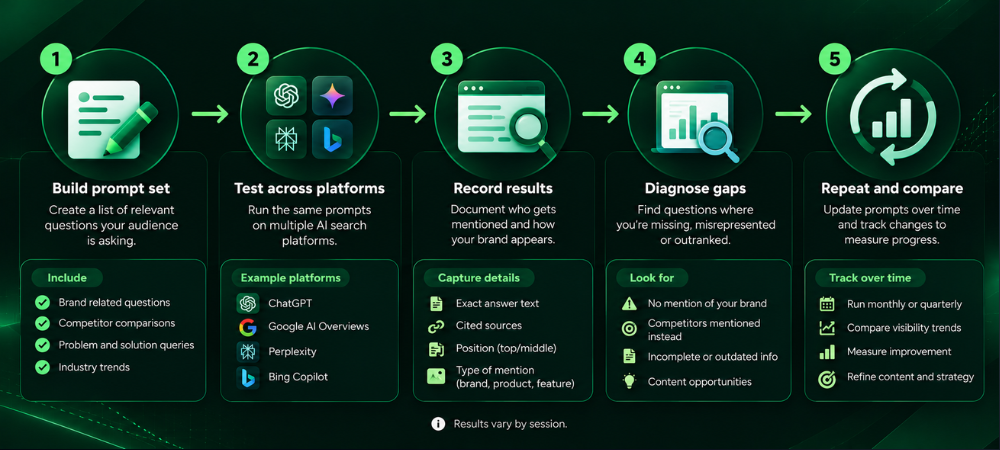
Step 1: Build A Prompt Set
List 25 to 50 questions your buyers ask while researching software. Pull them from sales call notes, support tickets, demo form fields, Search Console queries, and community threads. Cover each type:
| Prompt type | Example pattern |
|---|---|
| Problem | “How do finance teams reduce manual invoice approvals?” |
| Category | “What is accounts payable automation software?” |
| Competitor | “[Competitor] vs [your brand] for mid-size teams” |
| Alternatives | “Alternatives to [Competitor] for startups” |
| Integrations | “Does [your category] software integrate with NetSuite?” |
| Pricing | “How much does [category] software cost?” |
| Implementation | “How long does it take to implement [category] software?” |
Step 2: Test Across Platforms
Run each prompt in Google (checking whether an AI Overview appears), ChatGPT with search enabled, and Perplexity. Use a logged-out or clean browser session where possible, and note the location and any account settings.
Step 3: Record What You See
For every check, first log the date, platform, and exact prompt. Next, note whether your brand was mentioned, which of your URLs were cited, and which competitors appeared. Then record which third-party sources the platform cited (review sites, publications, forums), because they show you where the category conversation lives.
Step 4: Diagnose Missing Mentions
When your brand is absent, work through four checks:
- Relevance: Do you have a page that directly answers this question?
- Indexability: Is the page indexed, crawlable, and reachable without logging in or running scripts?
- Evidence Quality: Does the page have specifics (criteria, data, limitations, dates) or just claims?
- Topical Coverage: Is the question part of a connected set of pages, or an orphan?
Step 5: Repeat And compare
Re-run the same prompts monthly or quarterly with the same wording. Results vary across sessions, locations, and query phrasing, and a sample of 30 prompts doesn’t represent all AI search visibility. Look for patterns over time, not single results.
| Can You Measure AI Search Visibility Completely? No. Tracking tools can automate the prompt checks, but none captures every mention or citation across every platform, session, and phrasing. Treat the numbers as a consistent sample you can compare over time. Pair them with referral data in your analytics, which shows the visits that actually arrive. |
Sample Audit Table
These rows are illustrative examples of the format, not real audit results.
| Search question | Platform | Brand mentioned? | Cited URL | Competitors mentioned | Content gap | Recommended action |
|---|---|---|---|---|---|---|
| “Best [category] tools for 50-person teams” | ChatGPT Search | No | None | Competitor A, B | No comparison page with team-size criteria | Build a comparison guide with stated evaluation criteria |
| “[Competitor A] alternatives” | Perplexity | Yes | /alternatives/competitor-a | Competitor A, C | Page lacks pricing and migration details | Add pricing context and a migration section |
| “Does [category] integrate with Salesforce?” | Google AI Overview | No | None | Competitor B | Integration page is thin and not linked from product pages | Expand the integration page and add internal links |
| “How long does [category] implementation take?” | Perplexity | No | None | Competitor C | No implementation guide | Publish an implementation guide from onboarding data |
How To Build A SaaS SEO Content Strategy Around Buyer Intent
Every page should have a job in the buying journey and a clear next step. That means a page shouldn’t exist only to target another keyword variation. If two pages answer the same question for the same reader, combine them into one stronger page.
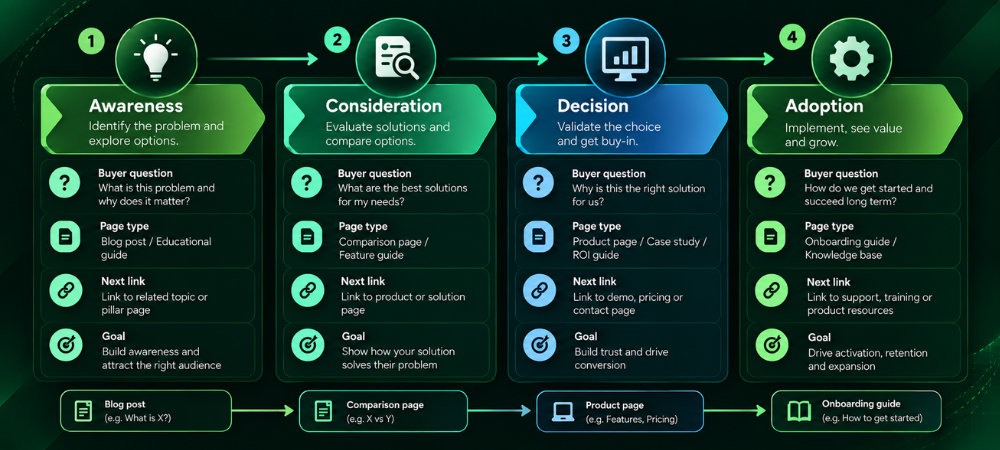
| Buyer stage | Example search query | Recommended page type | Internal link destination | Primary goal |
|---|---|---|---|---|
| Awareness | “why do invoices get stuck in approval” | Problem-solving guide | Category guide | Earn the reader’s trust and move them to category research |
| Consideration | “accounts payable automation software” | Category guide | Comparison or use-case page | Help the reader understand options |
| Consideration | “[Competitor] alternatives” | Alternatives page | Product page or demo | Position your product against specific needs |
| Decision | “[Your brand] pricing” | Pricing page | Demo or trial sign-up | Remove last-mile objections |
| Decision | “[Your brand] security compliance” | Security overview | Demo or sales contact | Pass IT and procurement review |
| Adoption | “[Your brand] NetSuite integration setup” | Integration docs and tutorials | Onboarding or support resources | Reduce time to value and churn |
For Each Stage, Ask The Same Four Questions:
- What Is The Buyer Likely Asking? Awareness: “What’s causing this problem?” Consideration: “What kinds of solutions exist?” Decision: “Will this work for us, and what will it cost?” Adoption: “How do I get this running?”
- What Format Answers It Best? Guides and explainers early, comparison tables and use cases in the middle, pricing and security detail late, documentation after purchase.
- What’s The Search Intent? Informational, commercial investigation, transactional, or navigational. Match the page to the intent instead of forcing one template everywhere.
- Where Does The Reader Go Next? Link to the logical next step, not just to the highest-authority page.
| How Should You Prioritize SaaS SEO Content? Start at the bottom of the funnel: pricing, comparison, alternatives, integration, and implementation pages. They’re closest to revenue and usually have fewer competing results than broad educational topics. Once those are solid, build the problem and category content that feeds them. If you have to choose between a new blog post and fixing a thin pricing or integration page, fix the page. |
Conversational Queries
Buyers increasingly type long, context-heavy questions. Instead of writing a page per phrasing, identify the follow-up questions around each topic and answer them within the relevant page, using clear headings that match how people ask. If you need help planning and producing this kind of connected content, Viacon’s content marketing services are built around the buyer journey.
Site Architecture For SaaS websites
A SaaS site typically has blog posts, feature pages, use cases, integrations, comparisons, templates, documentation, and customer stories. On their own, they do little. Linked in a deliberate path (problem, capability, use case, evidence), they work much better. By comparison, orphaned pages and pages that all link back to the homepage break that path. If your architecture needs rework, our web development services team can help with structure and implementation.
SaaS Technical SEO Checklist, Including AI Crawler Access
Technical problems can prevent search engines from crawling, indexing, or retrieving strong content. Work through this list for your priority pages (product, pricing, comparisons, integrations, key guides).
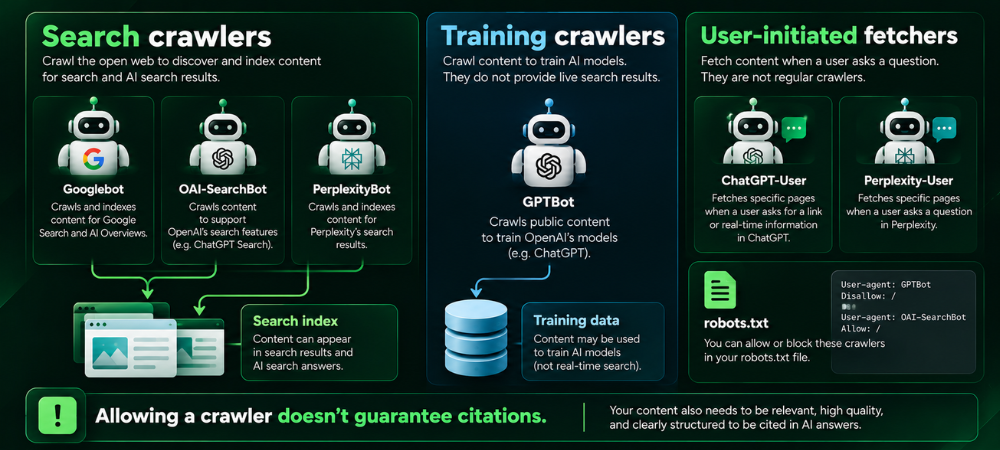
Crawler Access: Robots.txt, CDN, And WAF
Robots.txt: Check the rules for Googlebot, OAI-SearchBot, GPTBot, and PerplexityBot, plus any blanket Disallow rules. Crawlers read this file first, so one broad block can shut out search crawlers you meant to allow. If you find a problem, write explicit rules per bot and decide search access and training access separately.
CDN And WAF Rules: Review firewall and bot-protection logs for blocked or challenged crawler requests, and compare them against each vendor’s published IP ranges. Security tools can return 403 errors or challenges even when robots.txt allows a bot. Allowlist verified crawler IPs where appropriate, and don’t rely on user-agent strings alone.
Server Logs: Check what Googlebot, OAI-SearchBot, and PerplexityBot actually requested and which response codes they received. Logs show what crawlers got, not what you intended. Fix any blocks, errors, or timeouts they reveal.
Indexing Signals: Meta Robots, Sitemaps, And Canonicals
Meta Robots And Indexability: Look for noindex, nofollow and X-Robots-Tag headers on priority pages, and use URL Inspection in Search Console to confirm status. A noindexed page won’t appear in Google’s index. Remove stray directives, especially ones left over from staging.
XML Sitemap: Confirm it lists only canonical, indexable pages that return 200, and that it’s submitted in Search Console. Remove redirects, noindexed URLs, and duplicates, then regenerate the file.
Canonicals And Duplicates: Look for conflicting canonical tags, parameter URLs, and HTTP/HTTPS or www/non-www duplicates. Conflicting signals prevent search engines from identifying which URL to index. Set one canonical per page, and make sure your sitemap, internal links, and canonicals all point to the same version.
Page Health: Status Codes, Rendering, And Speed
Status Codes And Redirects: Crawl for 404s, 5xx errors, redirect chains, and soft 404s. Errors waste crawl resources and break user paths. Fix or redirect broken URLs in a single hop, and keep key pages returning 200.
JavaScript Rendering: View each page with JavaScript disabled and compare it to the rendered version. Ensure users and search engines can access body text, links, and tables without clicking, as they may not reliably retrieve content that loads only after user interaction. Server-side render or pre-render key content, and avoid hiding core text in tabs that load on demand.
Page Speed And Mobile Usability: Review Core Web Vitals and mobile usability in Search Console and PageSpeed Insights. Slow or broken mobile pages hurt both visitors and conversions. Compress images, reduce render-blocking scripts, and fix layout shifts.
Internal Linking And Orphan Pages
Crawl the site and list pages with no internal links, then check how many clicks it takes to reach your key pages from the homepage. Internal links help crawlers discover pages and show how they relate. Link orphans from relevant hub pages, and add contextual links from related content. Our SEO services team runs technical audits along these lines.
| Does Allowing AI Search Crawlers Guarantee Brand Mentions? No. Allowing OAI-SearchBot or PerplexityBot makes your content eligible to be retrieved. Whether it’s cited depends on relevance, content quality, and each platform’s own selection process, which isn’t public. The bots also don’t work alike, so check each vendor’s documentation instead of applying one policy to all of them. Our SEO services team runs technical audits along these lines. |
Platform-specific Checks: Google AI Overviews, ChatGPT Search, And Perplexity
The three systems discover and select sources differently, and none publishes a full ranking formula. The table separates general SEO fundamentals from checks tied to a specific platform, based on each company’s documentation.
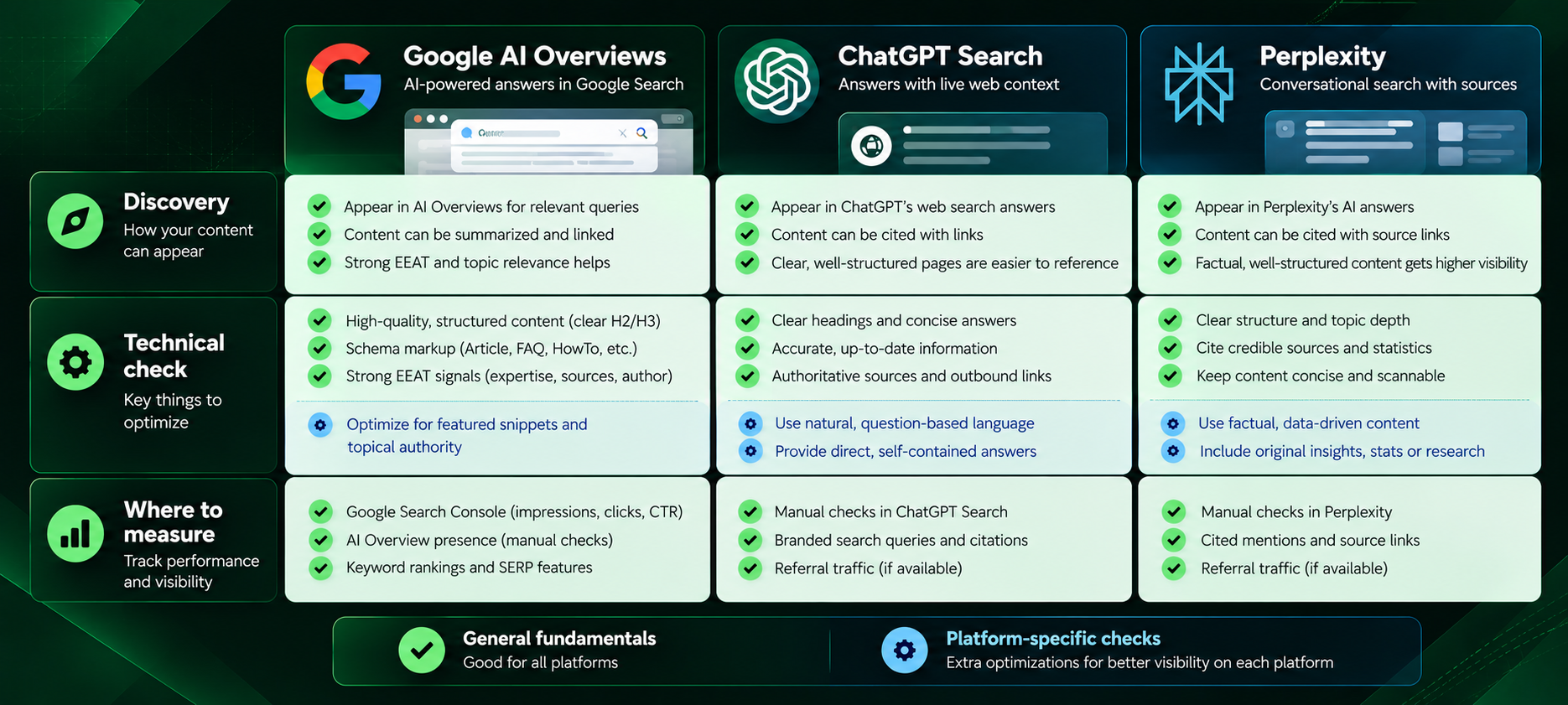
| Google AI Overviews | ChatGPT Search | Perplexity | |
|---|---|---|---|
| Discovery | Google Search systems. Google says standard SEO fundamentals apply and no special optimization is required | OpenAI’s search features rely on OAI-SearchBot | PerplexityBot surfaces and links sites in Perplexity search results |
| Platform-specific technical check | Page is indexed and eligible for Search; no nosnippet or similar preview limits you didn’t intend | OAI-SearchBot allowed in robots.txt and not blocked at the CDN or WAF. OpenAI says robots.txt changes can take about 24 hours to take effect | PerplexityBot allowed in robots.txt and WAF rules |
| Training vs. search crawler | Google manages its crawler controls separately; check Google’s crawler documentation before changing any rules | GPTBot is OpenAI’s training-related crawler and is independent of OAI-SearchBot. You can allow search and disallow training | Perplexity documents PerplexityBot as a search crawler, and Perplexity-User as a user-initiated fetcher that may not follow robots.txt |
| Content check | Complete coverage of related subtopics; structured data matching visible text | Clear, self-contained explanations and comparisons | Current information and clear sourcing |
| Where to measure | Search Console (AI features are included in overall Web search traffic) | Referral traffic in analytics, plus manual prompt checks | Referral traffic in analytics, plus manual prompt checks |
General fundamentals apply everywhere: crawlable, indexable pages, helpful original content, clear internal linking, and accurate structured data. Platform-specific checks are the crawler names, robots.txt rules, and IP ranges above. Google also states that no special schema.org markup is required for AI features, so don’t add markup in the hope of a boost.
Replace Generic Content With First-hand Evidence
Generic summaries are the easiest content for any system, human or automated, to substitute. The pages that earn attention usually contain information a competitor couldn’t copy from public sources.
Where You Have It, Include:
- Verified product capabilities, stated precisely, with version or plan details.
- Original screenshots and demonstrations, with descriptive alt text.
- Customer interviews and approved testimonials (with permission, and only real ones).
- Documented implementation lessons from onboarding and support.
- Limitations and compatibility details, including who the product isn’t right for.
- Original surveys or research, with sample size, method, and date disclosed.
- Commentary from actual subject-matter experts, named and credited.
- Documentation and credible external references.
Illustrative before-and-after
This example is hypothetical. It isn’t drawn from a client campaign and doesn’t show real results.
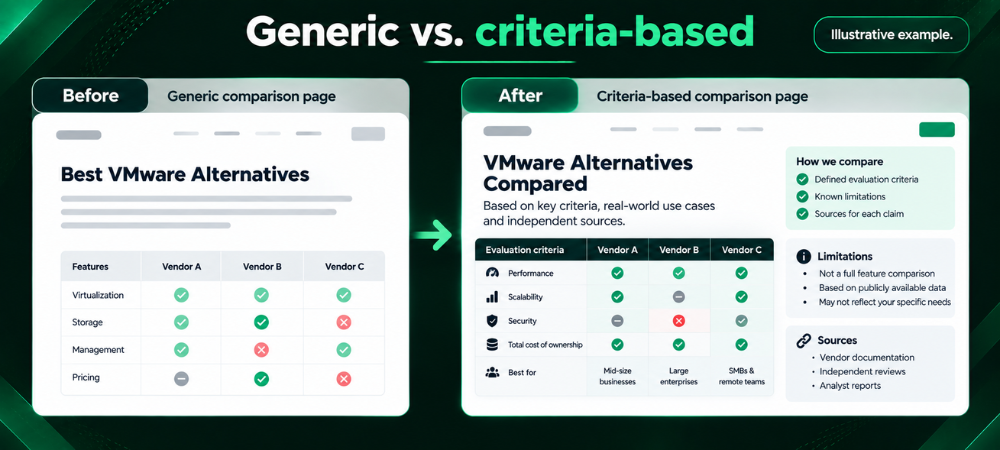
Before: generic comparison
“Tool A and Tool B are both great project management platforms. Tool A has powerful features and an easy-to-use interface, while Tool B is affordable and flexible. Choose the one that fits your needs.”
After: criteria-based comparison
How We Compared: We evaluated each tool for distributed teams of 10–50 people across five criteria: time-zone-aware scheduling, approval workflows, native integrations (Slack, Jira, Google Workspace), admin and permission controls, and published pricing at the 25-seat level. Last verified: [date].
Criterion Tool A Tool B Time-zone scheduling Native Via add-on Approval workflows Multi-step Single-step Jira integration Two-way sync One-way import Admin controls Role-based Limited Limitation No offline mode Reporting requires higher tier Best fit: Tool A for teams with formal approvals; Tool B for smaller teams that need a lightweight setup. Source: vendor documentation and pricing pages, [linked].
The second version states its method and date, gives readers comparable criteria, names limitations, and cites sources. A buyer can use it to decide, and an editor can check it.
How To measure SaaS SEO And AI Search Performance
No single tool captures everything. Search Console, web analytics, your CRM, and manual AI checks each answer different questions, so use them together and note what each can’t tell you. For help connecting search data to conversion outcomes, see our CRO and funnel optimization page.
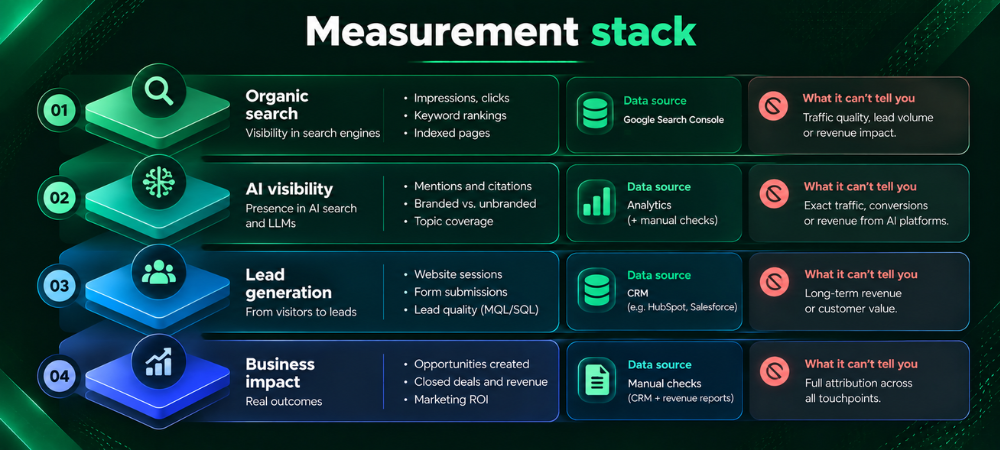
Organic Search
| Metric | What it measures | Where | Review | Action and limitations |
|---|---|---|---|---|
| Impressions and clicks | How often pages appear and get clicked | Google Search Console | Weekly or monthly | Investigate drops by page group. Search Console data is sampled and anonymised for some queries |
| Relevant queries | Which searches surface your pages | Search Console | Monthly | Find queries with high impressions and low CTR, then improve titles and content. Includes AI feature traffic within the Web search type, but doesn’t separate it cleanly |
| Landing-page performance | Sessions, engagement, and conversions by entry page | Web analytics (e.g., GA4) | Monthly | Fix pages with traffic but weak engagement. Attribution depends on consent and tracking setup |
| Rankings | Average position for target queries | Search Console or a rank tracker | Monthly | Treat as a diagnostic. Positions vary by location and personalization |
AI Search Visibility
| Metric | What it measures | Where | Review | Action and limitations |
|---|---|---|---|---|
| Brand mentions across a fixed prompt set | How often your brand appears in answers | Manual checks or a tracking tool | Monthly or quarterly | Fill content gaps on prompts where you’re absent. Results vary by session, so a sample isn’t comprehensive |
| Cited pages | Which of your URLs are cited | Manual log | Monthly | Strengthen cited pages and replicate their qualities elsewhere. Citation logic isn’t public |
| Competitor presence | Who appears instead of you | Manual log | Quarterly | Study their cited pages for evidence and format gaps |
| AI referral sessions | Visits from AI platforms | Web analytics (referrer reports) | Monthly | Some AI traffic arrives without a referrer and is undercounted |
Lead Generation
| Metric | What it measures | Where | Review | Action and limitations |
|---|---|---|---|---|
| Qualified organic sessions | Visits from relevant audiences | Web analytics, segmented by intent pages | Monthly | Shift content toward pages that attract qualified visitors. “Qualified” must be defined with sales |
| Demo requests and trial sign-ups | Conversions from organic | Analytics plus form or product data | Weekly or monthly | Improve CTAs and forms on high-traffic pages. Ad blockers and consent rules can hide events |
| Conversion rate | Share of organic sessions that convert | Web analytics | Monthly | Test page changes. Small samples produce noisy rates |
Business Impact
| Metric | What it measures | Where | Review | Action and limitations |
|---|---|---|---|---|
| Qualified opportunities | Organic-sourced leads that sales accepts | CRM | Monthly or quarterly | Feed lead quality back into content planning |
| Pipeline and revenue influenced | Deals touched by organic content | CRM with multi-touch attribution | Quarterly | Long B2B cycles and multiple touchpoints make attribution imperfect. Report it as influenced, not caused |
| Can SaaS SEO Generate Qualified Demo Requests? It can, especially from comparison, alternatives, and use-case pages that match high-intent searches. The outcome depends on your market, competition, product fit, and what happens after the click, so check the conversion path (page clarity, CTA, form length) alongside rankings. Use the lead generation metrics above to see which pages produce demos and which only produce traffic. |
| How Long Does SaaS SEO Take To Show Results? It varies with your site’s authority, competition, and how much needs fixing. Technical fixes such as unblocking crawlers or correcting canonicals can show effects within weeks. Content-led growth usually takes several months, longer in crowded categories. Anyone promising a specific timeline or ranking is guessing. A more useful approach is to set leading indicators (impressions, indexed pages, query coverage) and review them monthly before expecting pipeline movement. |
Multilingual SaaS SEO
Multilingual content can help you reach regional buyers, but translation alone isn’t enough. Four things matter:
- Search Intent: People in different markets phrase and prioritize questions differently. Research queries in each language instead of translating keyword lists.
- Localization: Adjust currency, regulations, integrations, examples, and compliance details to the market.
- Native-language Quality: Have a fluent speaker review the copy. Poor machine translation damages credibility.
- Technical Implementation: Use separate crawlable URLs per language and implement hreflang correctly. Make sure language versions link to each other.
What To prioritize Next
If you’re deciding where to start:
- Run the AI visibility audit with 25–50 prompts and log the results.
- Fix technical blockers on priority pages, including crawler and WAF access.
- Map your pages to the buying journey and merge pages that overlap.
- Add evidence (criteria, limitations, dates, original data) to your top comparison and category pages.
- Set up reporting that separates Search Console, analytics, CRM, and manual AI checks.
Rankings still matter. They drive qualified traffic, and strong organic pages tend to be the ones AI features can find and draw on too. The goal is to be visible and credible wherever buyers research, and to make the path from that research to a demo clear.
If you’d like an outside view, Viacon’s team can review your technical setup, content plan, and AI search visibility together. You can request a free audit to see where your SaaS SEO stands today.