In AI SaaS development, the first prototype usually looks better than expected. The prompts return clean answers, the interface feels stable, and the product seems ready for the market. In production, the goals change.
Customers bring confidential information, messy inputs, and requirements that never appeared during testing. Traffic can also jump overnight. At that point, your team no longer polishes a model experiment. It runs a system.
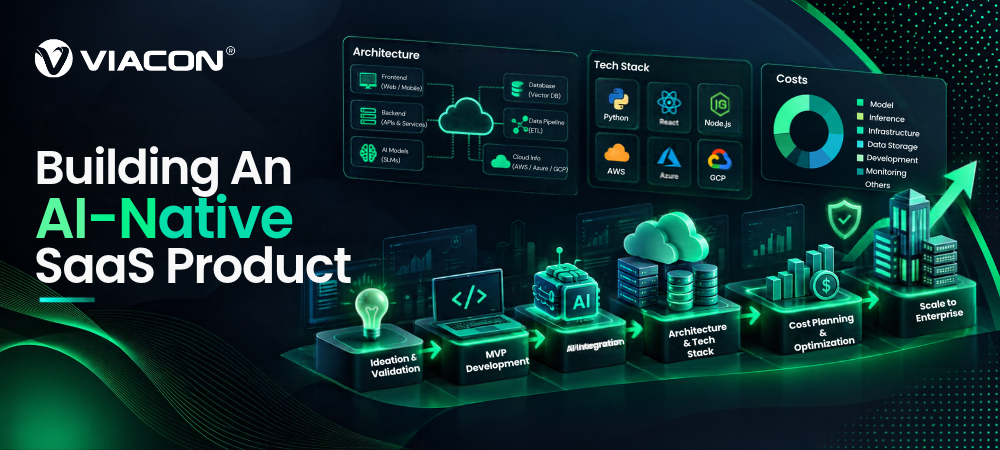
An AI-native SaaS product has to coordinate data pipelines, application logic, security controls, monitoring, billing, and model behavior in real use. So architecture, tech stack, and cost decisions need to reflect that pressure from day one. This guide to AI SaaS development walks through each decision in the order most teams face it.
What Makes A SaaS Product AI-native?
A SaaS product is AI-native when machine intelligence sits at the center of its main workflow. Remove the model, and the product can no longer deliver what it promised. If it still works, AI is probably an added feature.
This distinction shapes every part of AI SaaS development, from team size to infrastructure spend. If you want the wider context on planning and shipping software of this kind, our guide to SaaS product development covers the full lifecycle.
| AI-enabled SaaS | AI-native SaaS | |
|---|---|---|
| Role of the model | Adds a convenience feature | Delivers the core value |
| Without the model | Product still works | Product loses its purpose |
| Typical example | CRM with an email-draft button | Contract-review tool that finds and explains risky clauses |
| Main risk | Feature goes unused | Wrong output harms the customer’s work |
| Cost profile | Mostly fixed | Scales with usage |
A contract-review product makes the difference easy to see.
It Usually Does The Following:
- Ingests documents
- Preserves access permissions
- Locates relevant clauses
- Generates an analysis
- Shows supporting evidence
- Records user corrections
The model contributes to the review, but familiar software components carry much of the workload. Settling that distinction early in AI SaaS development keeps delivery scope, architecture, and operating budget from drifting apart.
Before You Start Building, Answer These Five Questions:
- What part of the customer’s work will the system take on?
- Must the result include evidence or a confidence indicator, or must a human approve it first?
- Where does the request go if the model can’t produce a usable response?
- Can prompts, logs, evaluation sets, or training jobs contain customer data?
- Once the product is live, what counts as an acceptable answer?
| How Long Does AI SaaS Development Take? A focused MVP usually takes 8 to 16 weeks. A production-ready platform takes longer. The final timeline depends on features, integrations, data readiness, security requirements, and testing. |
A Phased Plan Keeps AI SaaS Development Scope Honest:
- Weeks 1 to 3, discovery: Define the workflow, the success metric, and the data you can legally use.
- Weeks 4 to 10, MVP: Build one workflow end to end, with a basic evaluation set and usage logging.
- Weeks 11 to 16, hardening: Add tenant isolation, access controls, monitoring, and a rollback path.
- After launch: Expand integrations, tune cost, and refresh evaluation sets as real usage arrives.
Data readiness causes the most delays in AI SaaS development. If your customers’ documents sit in scattered formats with unclear permissions, budget extra weeks for ingestion work.
Design The AI SaaS Architecture For Bad Days
Most teams in AI SaaS development design for the best outcome. However, planning for failure produces a sturdier system and saves you from emergency rewrites later. These principles help.
The same applies whether you build a new product or add AI automation to an existing workflow. The model is the easy part. The controls around it decide whether the feature survives real traffic.
Don’t Hand Control To The Model
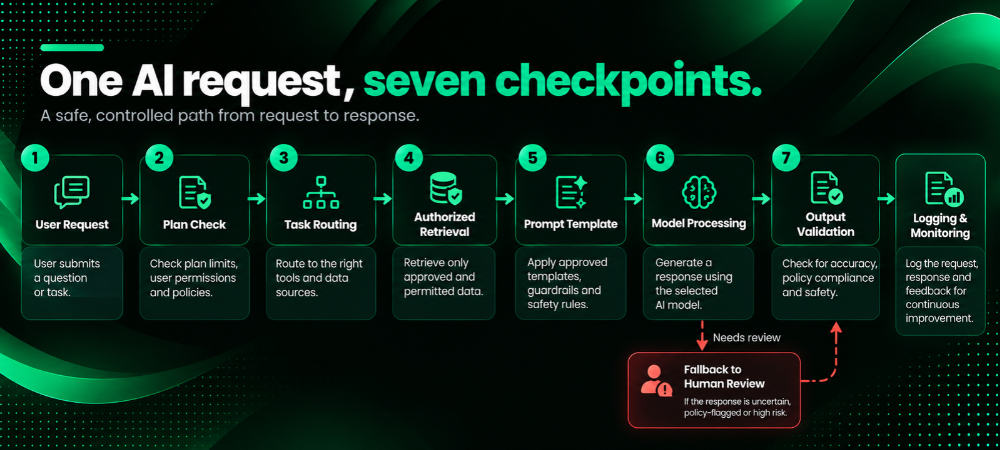
Sending a raw request to a model and printing the response works for a demo. It does not work in production. A production application needs permitted context, tenant boundary checks, the right model, output inspection, and a clear next step for every output.
Here Is How One Request Can Move Through The System:
- The user signs in, and the API checks the account’s plan limits.
- The orchestration service determines which task the user requested.
- The service fetches only authorized records from the database or vector index.
- The request goes into a prompt template with a recorded version.
- A selected model produces output in the required structure.
- The system checks format, source use, and policy conditions.
- The system logs the run details, then releases the response.
Test Retrieval Before Blaming The Model
Retrieval-augmented generation (RAG) isn’t a single switch inside the model. Several things can go wrong:
- Documents go stale.
- Chunking splits a clause from its qualifier.
- Metadata goes missing.
- Rankings favour the wrong passage.
- Access permissions never reach the index.
Attach tenant and ownership data to each indexed record. Then test whether the retrieval layer returns the right material before you score the final response. A larger model can’t reason from a clause it never received.
Also skip vector search when your data is small and already organized into reliable fields. SQL and standard filters often produce cleaner results with less operational weight. Extra infrastructure has to earn its place.
Isolate Tenants From Day One
Multi-tenancy deserves its own design decision in AI SaaS development, because one leak can expose a customer’s documents to another customer through a retrieved passage.
Teams Usually Pick One Of Three Patterns:
- Shared Database, tenant ID On Every Row: Cheapest to run, and the easiest to get wrong. Enforce row-level security in the database, not only in application code.
- Separate Schema Or Index Per Tenant: A middle path that limits blast radius and keeps backups simple.
- Separate Deployment Per Tenant: The most isolated option. Regulated buyers often require it, and it costs the most to operate.
Whatever you choose, apply the tenant filter before retrieval, not after. Filtering results after the search means the wrong data has already left the index.
Put Model Providers Behind An Interface
Providers change prices, context limits, rate limits, and model availability. When provider code spreads across your product, every change gets slower and harder.
The better approach is an internal model interface. It lets the application route work by complexity, latency, privacy needs, or cost. A smaller model might classify support requests, while a stronger one handles document analysis. Cached output can serve repeated questions, and a regulated customer can get a separate deployment path.
A narrow MVP may not need a routing layer. One provider behind a simple internal interface is often enough, because the abstraction matters more than the number of models.
Plan For Latency And Scale
Users judge an AI feature by how fast it feels. Stream partial responses to the interface so people see progress within a second or two. Push long tasks, such as document ingestion or batch analysis, to background queues and show a status indicator.
Provider rate limits also cap your throughput. Queue requests, retry with backoff, and set per-customer limits so one heavy user can’t starve everyone else.
| Do I Need To Train My Own AI Model For AI SaaS Development? Not at first. Most AI SaaS development teams start with an existing model through an API, which keeps costs predictable. Fine-tuning or self-hosting becomes worth considering when testing shows a specific gap in quality, control, privacy, or cost. Try better prompts and better retrieval first, because they fix most problems at a fraction of the price. |
Select An AI SaaS Tech Stack Your Team Can Run
No single stack wins for every AI SaaS development project. The right AI SaaS tech stack isn’t the one that looks impressive in an architecture diagram. It’s the one your engineers can diagnose during an incident without calling three former contractors.
Common Building Blocks
React or Next.js suit the front end. They support streaming responses, file uploads, review screens, and account management. When AI is one part of a larger web application, the model layer can stay behind APIs instead of spilling into the interface.
Other Common Choices Include:
- Python for model orchestration, data preparation, evaluation, and machine learning libraries.
- TypeScript or Go for high-volume application services.
- PostgreSQL for user accounts, subscriptions, permissions, workflow records, and model-run metadata.
- pgvector for early retrieval needs, before a dedicated vector database is justified.
- Redis for caching, job queues, and rate limiting.
- Object storage for customer files and generated assets.
A mixed-language system can work well. A small team, though, may lose more time maintaining service boundaries than it gains from language specialization.
A Working Stack Also Needs These Operational Pieces:
- Queue workers for ingestion and long-running model tasks.
- Versioning for prompts, models, and evaluation sets.
- Logs that remove or mask sensitive prompt content.
- Traces across retrieval, inference, retries, and tool calls.
- Usage metering by customer, workflow, and model.
- Staged deployments with a clear rollback route.
Interface decisions deserve the same care. Research into AI-driven user experience can help you place feedback controls, evidence panels, and review steps where users need them. Broader guidance on choosing a technology stack also helps you balance performance goals against your team’s skills.
A finished product still has to be found. Plan for search visibility early, and our guide to SaaS SEO explains how to cover traditional and AI-driven search.
Build, Buy, Or Mix?
Not every layer of AI SaaS development needs custom code. Use this rule of thumb: build what differentiates your product, and buy what every product needs.
| Layer | Usually Buy Or Use Managed | Usually Build |
|---|---|---|
| Model | Hosted model API | Fine-tuned model, only after testing proves the need |
| Authentication and billing | Managed identity and billing services | Plan limits and credit logic tied to your workflow |
| Vector search | pgvector or a managed vector service | Retrieval rules, chunking, and ranking tuned to your data |
| Observability | An LLM tracing and logging tool | Business-specific quality metrics |
| Core workflow | Nothing. This is your product. | Orchestration, validation, and review logic |
Who You Need On The Team
A lean AI SaaS development team can ship an MVP with a product owner, two or three full-stack engineers, one engineer who owns the model layer and evaluation, and a part-time designer. Add a security lead before you sign your first enterprise customer. Hire dedicated machine learning engineers only when you start fine-tuning or self-hosting.
Secure The Product And Meet Compliance Requirements
Enterprise buyers ask about security before they ask about features. Prepare answers early, because retrofitting controls into an AI SaaS development project costs far more than building them in.
Data Handling: Decide what customer data may reach a provider, how long the provider keeps it, and whether the provider may train on it. Sign a data processing agreement and choose provider settings that disable training on your traffic. Mask personal data in logs. Offer data deletion on request.
Prompt Injection: Uploaded files and web content can contain hidden instructions that try to hijack the model. Treat every retrieved document as untrusted input. Give the model the minimum tools and permissions it needs, and require approval before it takes any action with side effects, such as sending an email or changing a record.
Access Control: Enforce permissions in your application, not in the prompt. A prompt that says “don’t show salary data” is a request, not a control.
Compliance Frameworks: Most B2B buyers expect SOC 2 or an equivalent report. If you serve customers in Europe, plan for GDPR, including data residency questions. Also check how the EU AI Act classifies your use case, since the obligations differ for general-purpose tools and high-risk uses such as hiring or credit decisions. Buyers in healthcare add their own rules, such as HIPAA, and finance buyers bring audit requirements of their own.
Is My Customers’ Data Used To Train The AI Model?
It shouldn’t be unless the customer agrees in writing. Most major providers let you opt out of training on API traffic. Confirm this in your provider contract, state your policy in your terms of service, and keep customer data out of shared evaluation sets unless you have permission.
How Do I Stop One Customer From Seeing Another Customer’s Data?
Combine three controls. Store a tenant ID on every record, apply the tenant filter before retrieval, and test for leaks with automated cross-tenant queries in every release. Row-level security in the database adds a safety net if application code fails.
Put Evaluation Into Every Release
In AI SaaS development, choosing a stack and sketching an architecture is the easy part. Skipping evaluation sets you up for failure. Changes that look fine in demos often fail in production, so your evaluation must cover output quality, operating cost, and failure behavior before a change reaches customers.
Build A Five-Step Evaluation Roadmap
Use this sample roadmap:
- Build A Representative Evaluation Set: Include routine requests, difficult edge cases, and failures collected during testing. Score each release for task completion, factual grounding, policy compliance, latency, and cost.
- Automate Checks Where Results Are Testable: Validate structured output against a schema, compare citations with retrieved passages, and flag prohibited data patterns before the response reaches the interface. Nuanced answers still need sampled human review.
- Monitor Quality After Deployment: Server uptime doesn’t reveal whether answers are getting less accurate or useful. Track shifts in retrieval quality, model output, response time, and cost across prompt and model versions.
- Test The Highest-risk Workflows: Uploaded files may contain prompt-injection instructions, retrieval errors can expose another tenant’s records, and malformed requests may trigger repeated calls that drain the daily inference budget.
- Use A Consistent Risk Framework: The NIST Generative AI Profile helps teams examine confabulation, data privacy, information integrity, and pre-deployment testing without inventing a review method from scratch.
Keep Fixed Rules Outside The Model
Keep fixed rules outside the model. In an assessment platform, enrollment status, scoring rules, and access permissions shouldn’t depend on generated output. Reviewing the established workflows of a learning management system solution can help you separate useful AI tasks from processes that ordinary application logic handles better.
Test Integrations Separately
Integrations need their own tests as well. A sync error in a CRM or ERP integration can corrupt records your customer relies on, so run those paths before every release.
| What Should I Measure After Launch? Track five numbers per workflow: task success rate, the share of answers users edit or reject, average latency, cost per completed task, and the share of requests that fall back to human review. A rise in edits or rejections often signals a problem before customers complain. |
Calculate AI SaaS Development Cost From Usage
The cost of AI SaaS development includes more than design and engineering hours. Model inference, cloud infrastructure, data preparation, security work, evaluation, human review, and post-launch support all affect the budget.
Start with the expected unit cost of your main workflow.
Estimate These Inputs:
- Average input and output size
- Retrieved context added to each request
- Number of model calls per completed task
- Retry rates and fallback-model usage
- Document storage and indexing volume
- Human review time
- Monitoring and evaluation overhead
Then test an uncomfortable scenario. What happens if usage reaches five times the forecast and customers upload documents twice as long as expected?
Where The Money Goes
The table below shows indicative planning ranges for AI SaaS development, not quotes. Your numbers will move with scope, region, and team model, so replace them with estimates from your own vendors and engineers.
| Cost area | One-time or recurring | What drives it |
|---|---|---|
| MVP build (one core workflow) | One-time | Features, integrations, design depth |
| Production hardening (security, tenancy, monitoring) | One-time | Compliance targets, number of tenants |
| Data preparation and ingestion | One-time, then ongoing | Data quality, file formats, volume |
| Model inference | Recurring | Tokens per task, model tier, retries |
| Cloud hosting and storage | Recurring | Traffic, document volume, region |
| Evaluation and human review | Recurring | Risk level, review sampling rate |
| Maintenance and provider changes | Recurring | Number of integrations, release pace |
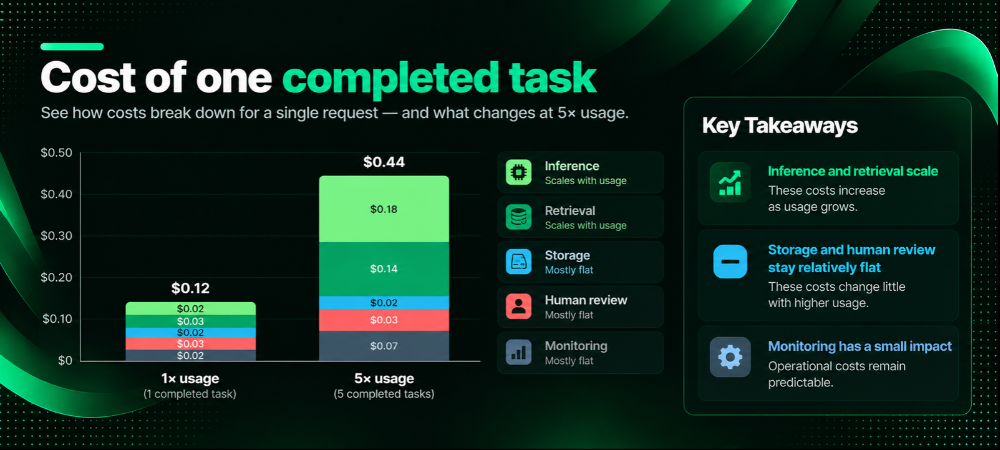
Five Ways to Cut Inference Cost In AI SaaS Development
- Route By Difficulty: Send simple tasks to a smaller model and reserve the strongest model for hard cases.
- Cache Repeated Work: Reuse answers for identical questions and reuse embeddings for unchanged documents.
- Trim The Context: Retrieve fewer, better passages instead of filling the window.
- Batch Background Jobs: Run non-urgent work through lower-priced batch options when your provider offers them.
- Cap Retries: Set a hard limit per request so a bug can’t burn the daily budget.
Teams often optimize the model while overlooking the surrounding workflow. A cheaper model paired with poor retrieval can create support tickets and churn. A powerful model used on every request can make a popular feature financially unworkable.
Budget for acquisition as well. Products that depend on third-party mentions and search visibility should list AI-powered link building as a separate go-to-market expense instead of folding it into the development estimate. For the wider picture on filling your pipeline, see our guide to B2B SaaS marketing.
Costs also shift after launch. Evaluation sets need upkeep, new integrations add failure paths, customer language changes, providers retire models, and enterprise buyers request controls outside the original scope. Build a maintenance line into the budget from the start.
| What Is The Cost Of Building An AI SaaS Product? No universal budget exists. The total depends on product complexity, integrations, data preparation, security requirements, model usage, and infrastructure. Estimate one-time development costs separately from recurring hosting, inference, monitoring, and maintenance, and review both lines every quarter. |
Price The Product So Usage Doesn’t Eat Your Margin
AI features carry a real marginal cost for every request. A flat monthly fee can turn profitable customers into losses if a few of them use the product heavily. Pick a pricing model that matches how cost grows:
- Seat-based: Simple to sell, but heavy users can cost far more than light users.
- Usage-based: Aligns revenue with cost, though customers dislike unpredictable bills.
- Credits or tiers with included usage: Gives buyers a predictable bill and gives you a cap. Many AI products land here.
- Hybrid: A platform fee plus usage above a threshold.
Whatever model you choose, meter usage by customer and workflow from the first release. You can’t price what you can’t measure, and enterprise buyers will ask for usage reports.
If you want to test a pricing model against your margins before launch, our business model consulting team can pressure-test the numbers with you.
| How Do I Price An AI SaaS Product? Start from your cost per completed task, add the cost of review and support, then set a gross margin target that fits your market. Compare the result with the value the customer gets, such as hours saved. Price between those two numbers, and revisit the figure after the first few months of real usage data. |
Plan How Buyers Will Find The Product
A product that works still needs an audience. Buyers now research software in AI assistants as well as search engines, so your launch plan should cover both. Earn mentions in publications that those assistants cite, and track whether your brand appears when buyers ask category questions.
This is the problem Viacon built Corda to solve. Corda is a SaaS platform for AI search visibility and digital PR. Whatever tool you use, set a visibility baseline before launch so you can see what your marketing changes.
Build For The Product You’ll Have To Operate
AI-native SaaS products rarely fail in one spectacular moment. More often, inference costs creep upward, retrieval quality softens, review queues lengthen, and nobody can tell which prompt or model change caused the problem.
That need for operational visibility reaches beyond software delivery. A publisher management platform, for example, centralizes content orders, publishing activity, and campaign administration instead of scattering each task across email threads and spreadsheets.
Disciplined AI software development makes those shifts visible. Keep the application in charge, isolate provider-specific logic, test retrieval separately, meter usage by workflow, and put evaluation inside the release process. A smaller first version is often the smarter move, as long as it contains the operational structure production demands.
If you want a partner for the build, our SaaS product development services cover architecture, delivery, and release operations in one engagement.
That is the harder test of AI SaaS development. The product must do more than generate an impressive answer. Its output, data handling, cost, and failure behavior must stay understandable once customers depend on it, and once your team has to defend every architectural choice in the next budget meeting.