Over 4 hours of the average person’s day now happen inside mobile apps, and businesses without one are increasingly invisible to their own customers. But knowing how to build a mobile app that actually gets downloaded, used, and retained is a different problem than simply hiring someone to write code.
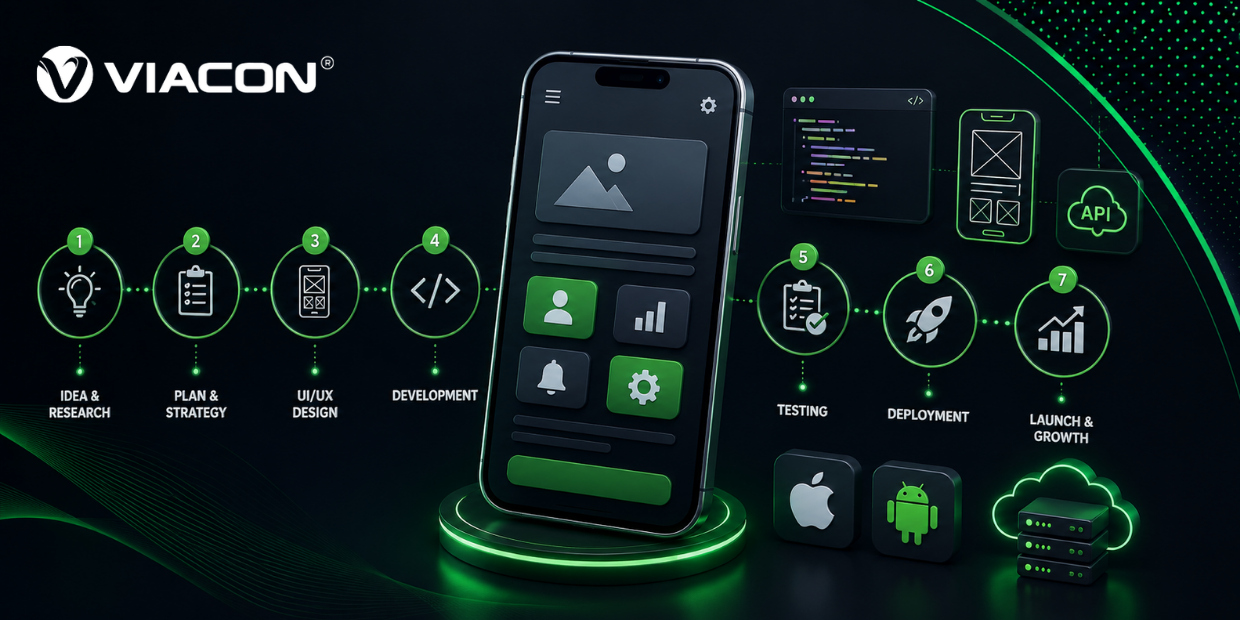
This guide walks through the complete mobile app development process from validating your idea to choosing a platform, designing the experience, developing and testing, launching on the app stores, and maintaining the app after release. We’ll also cover real 2026 costs, timelines, common mistakes, and where AI, AR/VR, and other emerging trends fit in.
Quick answer: Building a mobile app involves seven core stages market research and idea validation. Planning your MVP, UI/UX design, choosing your platform and tech stack, development, QA testing, and app store launch, followed by ongoing maintenance. A simple MVP typically costs $15,000–$60,000 and takes 3–5 months; a full-featured app with backend infrastructure can run $60,000–$250,000+ over 6–12 months.
If you’d rather skip the DIY route, Viacon’s mobile app development team can scope your project and give you a fixed quote within days.
What Is Mobile App Development?
Mobile app development is the end-to-end process of designing, building, testing, and maintaining software built specifically to run on smartphones and tablets. It covers everything from the first wireframe to post-launch updates. And it spans three broad approaches: native development (separate codebases for iOS and Android). Cross-platform development (one shared codebase for both), and no-code/low-code app builders.
The same fundamentals apply whether you’re building a standalone app or a companion app for an ecommerce store. The platform decision below is what changes.
Cross-platform mobile app development using frameworks like Flutter, React Native, and Kotlin Multiplatform has become the default choice for most businesses. In 2026, it cuts development cost and time roughly in half compared to building two native apps. Without the performance trade-offs that used to come with it.
| Can a cross-platform app still use native device features? | Yes. Modern frameworks support native modules and plugins for the camera, GPS, biometric sensors, push notifications, and other hardware-level features, so a shared codebase doesn’t mean a limited app. |
Step 1: Validate The Idea Before You Build Anything
The single biggest reason apps fail isn’t bad design or buggy code, it’s building something nobody needed. Before writing a single line of code or briefing a designer, answer three questions in writing. What specific problem does this app solve, who exactly has that problem, and is a mobile app actually the right format for solving it (versus a website, a feature inside an existing app, or no software at all)?
Competitor research belongs here, too. Look at what similar apps in your space already do well. Where users complain in app store reviews, and what gap you can credibly fill. This is also the stage to decide your business model subscription, freemium, transactional, or ad-supported, because that choice will shape almost every technical decision that follows. If you’re unsure which model fits. This is exactly what business model consulting is for, before any design or development spend begins.
Step 2: Define Your MVP And Core Feature Set
Trying to launch every feature on day one is the second most common reason apps stall out before they ship. A Minimum Viable Product (MVP) is the smallest version of your app that delivers real value to a defined user and lets you start collecting feedback and usage data.
A Practical Way To Scope An MVP:
- List every feature you can imagine, then sort them into “must-have for launch,” “nice to have,” and “future roadmap.”
- Map the core user journey, the single most important sequence a user takes from opening the app to getting value from it and build only what supports that journey first.
- Set 2–3 measurable success metrics (activation rate, day-7 retention, conversion rate) before development starts, so you know what you’re testing for after launch.
A well-scoped MVP also keeps your initial cost to build a mobile app predictable. Since scope creep is the most common cause of budget overruns. Viacon’s SaaS product development team frequently runs this scoping exercise as the first paid milestone with new clients, before any design or development work begins.
Step 3: Choose Your Platform And Development Approach
This decision affects your timeline, budget, and long-term maintenance burden more than any other single choice in the process.
(i) Native App Development
Native apps are built separately for iOS (Swift) and Android (Kotlin/Java), giving the best possible performance and full, immediate access to new OS features. They’re the right call for apps with heavy graphics, AR/VR, or performance-critical functionality, but they mean maintaining two codebases and roughly double the development cost.
(ii) Cross-Platform App Development
Frameworks like Flutter, React Native, and Kotlin Multiplatform let you write one codebase that compiles to both iOS and Android. In 2026, this is the practical default for most business apps: e-commerce, booking, fintech-lite, content, and service apps rarely need the performance ceiling that justifies going fully native, and a shared codebase means faster releases and one team maintaining one app instead of two.
(iii) No-Code and Low-Code Platforms
Tools like Bubble, Adalo, and FlutterFlow let non-technical founders assemble a working app from visual building blocks. They’re a reasonable way to test an idea cheaply. But they tend to hit a ceiling fast on custom logic, complex integrations, and performance at scale. Most businesses that start no-code eventually migrate to a custom build once the product proves itself.
| Approach | Typical Cost | Typical Timeline | Best For |
| No-code/low-code | $500–$15,000 | 1–8 weeks | Early validation, simple internal tools |
| Cross-platform (Flutter/React Native) | $15,000–$120,000 | 3–6 months | Most business apps, startups, MVPs |
| Native (iOS + Android) | $40,000–$250,000+ | 6–12+ months | Performance-critical, AR/VR, gaming apps |
If you’re unsure which path fits your product and budget, an audit of your requirements before you commit to a budget can save weeks of rework later.
Step 4: Design The UI/UX
Good app design isn’t decoration; it’s the difference between a user completing onboarding or deleting the app in the first session. This stage typically includes:
Wireframing the core screens and user flows at a low-fidelity level so the structure can be tested and changed cheaply before visual design begins. From there, the design moves into high-fidelity mockups and an interactive prototype. Which is what most teams use for early user testing and stakeholder sign-off.
Throughout, the focus stays on accessibility, platform-specific design conventions (Apple’s Human Interface Guidelines vs. Google’s Material Design). And reducing friction at every step a new user has to take before reaching the app’s core value. The same conversion-focused design principles that drive results on web and app alike.
Step 5: Build Your Tech Stack And Start Development
With design approved, development typically splits into three parallel tracks: the front-end (what users see and interact with). The back-end (servers, databases, business logic). And API integrations (payments, maps, authentication, analytics, and any third-party services the app depends on).
Common 2026 stack choices include Flutter or React Native for cross-platform front-ends, Swift/Kotlin for native builds, and Node.js, Python (Django/FastAPI), or Firebase for back-end infrastructure, depending on scale and budget.
Development should run in short sprints with regular demos, not as one long black-box build, that’s the single best way to catch scope or direction problems early instead of at the end. If your in-house team needs extra capacity for a sprint or two, dedicated resource hiring is usually faster than a full freelance search.
Step 6: Test Before You Launch
Skipping or rushing QA is one of the most expensive mistakes a team can make, because bugs caught after launch cost far more in lost users and 1-star reviews than they do in pre-launch testing time. A thorough pre-launch test pass covers functional testing (does every feature work as intended). Device and OS compatibility testing across a representative spread of phones and OS versions, performance testing under real-world network conditions, security testing for data handling and authentication, and usability testing with a handful of real target users, not just the internal team.
A closed beta releasing to a small group of real users through TestFlight (iOS) or a Google Play internal track before a full public launch is one of the highest-leverage steps in this entire process, and it’s the one most first-time founders skip.
Step 7: Launch On The App Store And Google Play
Publishing isn’t a single click, it’s its own mini-project. You’ll need a developer account on each platform (a one-time $25 fee for Google Play, a $99/year fee for Apple). App Store Optimization (ASO) involves optimized title, screenshots, keywords, and descriptions. Since this functions much like SEO for the app stores themselves, and compliance with each platform’s review guidelines. This can add a few days to a couple of weeks to your timeline, depending on the app category and how clean your first submission is.
Plan your launch marketing alongside, not after, development. Apps with a content and PR plan ready before launch day consistently see better first-week download numbers than apps that start marketing after the app is already live. Viacon’s content marketing team typically starts this groundwork 4–6 weeks before a client’s planned release date, with paid acquisition layered in once the app is live.
Step 8: Maintain, Update, And Grow Post-Launch
Launch day is the beginning of the work, not the end of it. Budget for ongoing maintenance typically 15–20% of the original build cost annually to cover OS updates, bug fixes, security patches, and new feature releases. Most teams settle into a cadence of 3–4 meaningful updates a year. Supplemented by tracking activation, retention, and churn through analytics. And CRM/ERP integrations (App Store Connect, Google Play Console, or a dedicated tool like Mixpanel or Amplitude). So every update is driven by actual usage data rather than guesswork.
Common Mistakes That Sink Mobile Apps
A handful of mistakes account for most failed app launches. And nearly all of them are avoidable with the right process. Skipping market validation and building based on assumptions rather than evidence is the most common one. Closely followed by overloading the MVP with features instead of shipping a focused first version.
Beyond that, teams routinely underestimate the testing phase and treat app store optimization as an afterthought instead of a launch requirement. And budget for development, but not for the ongoing growth strategy that keeps an app visible and competitive after it ships.
2026 Trends Shaping Mobile App Development
A few shifts are worth factoring into your plan, even if they’re not part of your MVP. AI-powered personalization and in-app assistants are now standard in categories from retail to fintech, not just novelty features. And the same AI shift is reshaping how people search, which is why pairing your app launch with AI search optimization (GEO) is increasingly part of a complete go-to-market plan.
AR/VR integration has moved well beyond gaming into retail try-before-you-buy and field-service training use cases. On the infrastructure side, 5G and edge computing are enabling richer real-time features without the latency problems that used to rule them out, and IoT connectivity is increasingly expected in health, fitness, and smart-home apps as a baseline feature rather than an add-on.
None of these need to be in your version 1, but designing your architecture with room to add them later will save a costly rebuild down the line.
How Much Does It Cost To Build A Mobile App?
Realistic 2026 ranges, based on scope:
- Simple MVP (core flow, basic backend, single platform or shared codebase): $15,000–$60,000, 3–5 months.
- Mid-complexity app (user accounts, payments, push notifications, admin dashboard): $60,000–$150,000, 5–8 months.
- Complex/enterprise app (custom integrations, real-time features, multi-region compliance): $150,000–$300,000+, 8–14 months.
Agency location materially affects these numbers. US/EU agencies typically charge 2–3x more for comparable work than agencies in regions like India or Eastern Europe, without a proportional quality difference for most business app categories.
Should You Build In-House, Hire Freelancers, Or Work With An Agency?
An in-house team gives you the most long-term control but is slow and expensive to assemble. And most early-stage businesses don’t have enough ongoing work to keep a full team busy post-launch. Freelancers are cost-effective and flexible, but put the project-management burden on you. And coordinating multiple specialists (design, iOS, Android, backend, QA) yourself is its own job.
isA development agency sits in the middle: you get an assembled team with project management, design, development, and QA already coordinated, at a fixed scope and (usually) a fixed price. The trade-off being a higher hourly-equivalent cost than freelancers, offset by far lower coordination overhead and risk.
Why Choose Viacon For Mobile App Development?
Viacon is a full-service digital and AI solutions agency, with operating teams in Dubai, UAE and West Bengal, India. Serving clients across the UAE and US markets since 2018. We sit at the intersection of two things most agencies treat as separate: building the app, and getting people to actually find and use it.
What does that mean in practice for a mobile app project:
One Team, End To End
Your app doesn’t get handed off between a dev shop and a separate marketing agency. Our development team builds the product, and the same company’s digital marketing services plan and run the launch. So nothing falls through the cracks between “ship it” and “grow it.”
Cross-Platform Expertise That Controls Cost
We default to Flutter and React Native where it fits the product. This is consistently the reason our clients report builds running 20–30% leaner than competing quotes for comparable scope, without cutting corners on quality.
AI and Automation Built In From Day One
As an AI automation practice as well as a development shop. We design app architecture with AI-powered features, CRM integrations, and analytics in mind from the start. So adding intelligent features later doesn’t mean a rebuild.
A Track Record Outside The Demo Reel
You can review real outcomes, not just portfolio screenshots, in our case studies.
If you’re ready to scope your project, get in touch with Viacon for a free consultation. And a fixed quote, no obligation, just a clear plan for what your app would actually take to build.
Frequently Asked Questions:
Q1.How Long Does It Take To Build A Mobile App?
A: A simple MVP typically takes 3–5 months from kickoff to launch; a mid-complexity app with payments and user accounts takes 5–8 months; complex, enterprise-grade apps can take 8–14 months or more.
Q2. How Much Does It Cost To Build A Mobile App In 2026?
A: Costs range from roughly $15,000 for a simple MVP up to $300,000+ for a complex, enterprise-grade app, depending on feature scope, platform count, and the development team’s location.
Q3.Is It Better To Build A Native App Or A Cross-platform App?
A: For most business apps, e-commerce, booking, content, and service apps, cross-platform development (Flutter, React Native) is faster and cheaper with minimal performance trade-off. Native development makes sense for apps that are graphics-intensive, performance-critical, or need to use brand-new OS features immediately on release.
Q4.Can I Build A Mobile App Without Coding?
A: Yes, no-code and low-code platforms can get a simple app live in days to weeks. They work well for validating an idea, but tend to hit limits on custom logic and scale. Which is why many no-code MVPs are later rebuilt as custom apps once they’ve proven demand.
Q5.Do I Need A Developer Account For The App Store And Google Play?
A: Yes, Apple charges a $99/year developer account fee and Google Play a one-time $25 fee. And both require your app to pass a review process before it goes live.
Ready To Turn Your Idea Into A Working App?
Talk to Viacon’s app development team about your project