Every page on the internet has to clear two invisible checkpoints before it ever shows up in a search result. Google crawling and indexing. Miss either one, and it doesn’t matter how good your content is; nobody will ever find it. Before any page competes for a ranking position, Google first has to discover it and understand it. And decide whether it deserves a spot in its database, a step most people simply call Google indexing.
This is where most beginners struggle. They publish a page, wait, and it simply never appears in search, not because the writing was bad, but because some technical barrier quietly kept Google from crawling or indexing the page in the first place. Let’s break down how Google crawling and indexing actually work in 2026. What usually goes wrong, and how to fix it.
What Do “Crawl” And “Index” Actually Mean?
Before going further, it helps to separate the two terms, since people often use them interchangeably:
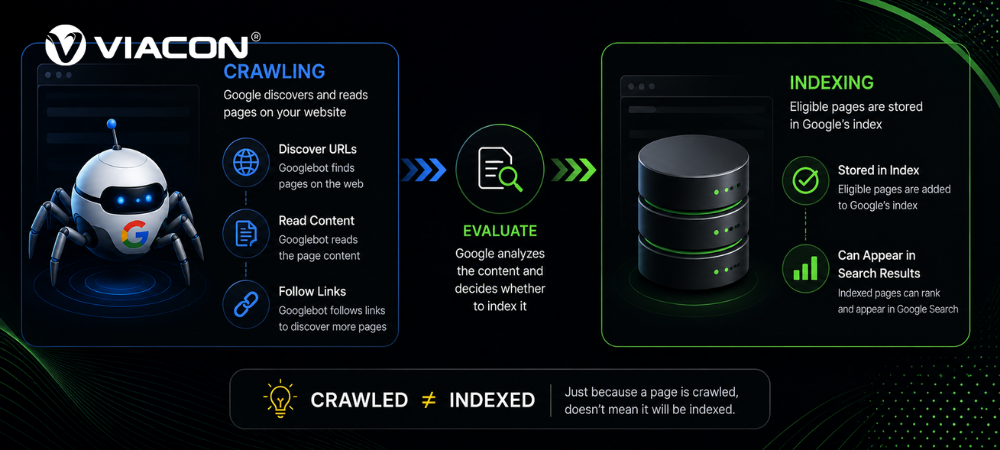
- Crawling is the discovery phase. Googlebot finds a URL and visits it to see what’s there.
- Indexing is the storage phase. Google adds the page to its searchable database if it passes quality checks. This is Google indexing, sometimes just called website indexing.
A page can be crawled but never indexed. It can also sit in the index but rank poorly. Crawling and indexing are prerequisites for ranking, not the same thing as ranking itself.
Getting both right consistently isn’t really a one-off fix; it’s an ongoing technical foundation. That’s the gap dedicated SEO services are meant to close: catching crawl and index issues before they quietly cap your visibility for months.
How Does Google Search Works In 2026?
Search used to run on three core stages: crawling, indexing, and ranking. While the core process remains the same, Google now uses AI-powered discovery and vector-based understanding to execute each stage more intelligently. Here’s a realistic breakdown of how a page moves from a blank URL to a search result today.
Stage 1: Discovery And Crawling
Before Google can rank anything, it has to find it. Googlebot maintains a discovery “queue” of URLs it intends to visit next, and it fills that queue from a few main sources: links from pages it already knows about, your XML sitemap submitted through Search Console, external backlinks, and social signals pointing to the URL.
Pro tip: If a page isn’t showing up in search at all, check your robots.txt file first. It’s one of the most common (and most avoidable) reasons Googlebot never visits a page. A single misplaced disallow rule can block an entire section of a site without anyone noticing.
Once Googlebot reaches your site, it doesn’t crawl everything indiscriminately. Google allocates a crawl budget based on your site’s speed, authority, and server responsiveness. Slow, error-prone sites get crawled less frequently and less deeply. Google also distinguishes between discovery crawls (finding brand-new pages) and refresh crawls (re-checking pages it already knows about for updates).
Stage 2: Rendering And Indexing
Once a page is discovered, Google moves into rendering, and this is where a lot of SEO problems quietly begin. Modern Googlebot doesn’t just read raw HTML. It opens the page in a background browser and renders it the way a human visitor would, processing layout, images, and JavaScript along the way.
After rendering, Google’s systems break the content into smaller chunks (roughly 300–500 tokens) and evaluate each chunk for semantic density, essentially asking whether it answers a real user question or is just filler. Google often classifies thin, repetitive, or unedited AI-generated content as low value and chooses not to index it.
Google moves pages that pass its quality checks into the index, but it prioritizes them differently. It frequently refreshes high-demand pages, crawls lower-priority pages less often, and keeps rarely searched content indexed in a long-tail archive that seldom appears in search results. Where your pages land in that hierarchy has a direct effect on how often Google revisits and re-evaluates them.
If Google Crawls Your Pages But Doesn’t Index Them, One Of These Issues Is Usually Responsible:
- Accidental
noindextags left over from staging or a CMS default. - Canonical Tag Conflicts, where a page points Google to a different URL as the “real” version.
- Thin Or Duplicate Content that doesn’t clear the semantic-density bar.
- JavaScript-rendered Content that doesn’t load properly during Googlebot’s rendering pass.
- Orphan Pages with no internal links pointing to them, making them hard to rediscover.
- Crawl Budget Waste from large numbers of low-value URLs (filters, tags, duplicate parameters) competing for the same limited crawl allowance.
JavaScript rendering issues, in particular, tend to need a developer’s eye rather than a marketer’s. If pages depend on client-side rendering that Googlebot struggles with, that’s usually a job for the team that built the front end in the first place, not the team writing the content, which is where web and app development work and SEO actually overlap more than people expect.
Diagnosing the cause of an indexing gap often takes more than a quick review of Search Console. A comprehensive SEO Audit, especially an international seo audit for global websites, helps identify hidden indexing, crawling, and content issues before they impact your organic visibility.
Stage 3: Ranking And Serving
Crawling and indexing get a page into the race. Ranking and serving decide where it finishes. Once a user types a query, Google interprets intent as transactional, informational, or navigational. And selects the best matches from everything it has indexed, all within a fraction of a second.
The Signals That Decide The Outcome Include:
- Relevance – How closely the page matches the query.
- Authority – Whether other credible sites link to it.
- User experience – Page speed, mobile-friendliness, and overall usability.
- E-E-A-T – Whether the content demonstrates genuine experience, expertise, authoritativeness, and trustworthiness.
In 2026, AI Overviews and generative summaries sit at the very top of many SERPs, which means a meaningful share of clicks never even reach the traditional blue links. Pages with clear headings and direct answers near the top are more likely to appear in AI-generated summaries, while Google and AI systems often overlook pages that rely heavily on keyword density.
Optimizing specifically for that kind of visibility is becoming its own discipline, which is what AI search optimization (GEO) is built around: getting cited inside generative answers, not just ranked underneath them.
This is one reason a broader content strategy matters more than chasing any single keyword. Google is increasingly rewarding content that’s genuinely structured to answer questions rather than content that just mentions them, which is exactly the gap content marketing services are designed to close at scale.
How To Check Your Website Indexing Status?
You don’t have to guess. Two quick checks will tell you exactly where a page stands:
- Search Console’s URL Inspection tool – Paste in any URL, and it will tell you whether the page is indexed, when it was last crawled, and exactly why it might be excluded if it isn’t.
- The
site:search operator – Typingsite:yourdomain.com/page-urlGoogle will show you whether that specific URL appears in the index at all. Search Console provides more detailed insights, but this method offers a quick way to verify the basics.
If a page shows as “crawled, currently not indexed,” that’s Google telling you it saw the page and chose not to store it, usually a content-quality or duplication issue rather than a technical block.
How To Help Google Index Your Pages Faster?
A few proven habits help Google discover and index new pages faster. They often make the difference between quick indexing and weeks of waiting.
- Submit and keep an updated XML sitemap in Search Console.
- Link to new pages internally from pages Google already crawls often.
- Fix crawl errors and broken links promptly instead of letting them accumulate.
- Improve site speed and server response time to protect your crawl budget.
- Avoid creating large volumes of near-duplicate URLs (filters, parameters, thin tag pages).
- Build genuine backlinks, since external links are still one of the strongest discovery signals.
For sites with thousands of pages, ecommerce catalogs, large publishers, and multi-location businesses, managing crawl budget and indexing at scale isn’t really a manual task anymore. That’s the specific problem programmatic SEO is designed to solve by templating and prioritizing pages so Google’s limited crawl budget gets spent on the URLs that actually matter.
Frequently Asked Questions:
Q1.What Is Crawl Budget, And Why Does It Matter?
A: Crawl budget is the number of pages Google is willing to crawl on your site within a given timeframe, based on your site’s authority, speed, and server health. Sites that waste crawl budget on low-value URLs, duplicate filters, thin tag pages, and broken links often end up with important pages crawled less often than they should be.
Q2.How Long Does It Take For Google To Crawl And Index A New Page?
A: Google can index a new page within hours or take several weeks. The timeline depends on your site’s authority, how frequently Google crawls your website, and whether you link the new page from pages that Google already visits regularly.
Q3.Why Is My Page Indexed But Not Ranking?
A: Indexing only confirms Google stored the page; it says nothing about quality relative to competitors. Google may index a page, but it won’t rank well if the content is thin, lacks authority signals, or fails to satisfy search intent as effectively as competing pages.
Q4.Does Blocking A Page In Robots.txt Remove It From The Index?
A: No. Robots.txt only blocks crawling, not indexing. If you block a page after Google indexes it, Google may keep the page in its index without re-evaluating the content. Use a noindex Tag if the goal is removal.
Q5.Do AI Overviews Affect Whether My Page Gets Crawled?
A: Not directly, crawling and indexing still run on the same fundamentals. But AI Overviews change what happens after indexing, pulling structured, directly answering content into summaries more often than dense, keyword-heavy pages.
Final Thoughts
Google crawling and indexing are the unglamorous plumbing behind every ranking conversation, and they’re also where most avoidable traffic loss happens. Google will almost always discover, index, and fairly evaluate a technically sound, well-linked, and genuinely useful page. A page buried behind a robots.txt mistake, a stray noindex tag, or a crawl-budget bottleneck never gets that chance, no matter how good the writing is.
If you’ve checked Search Console and you’re still seeing pages stuck in limbo, it’s usually faster to have a second set of eyes look at the technical setup than to keep guessing. You can see how this plays out in practice in our client case studies or get in touch if you’d rather have someone walk through your site’s crawling and indexing health with you directly.