
Short answer: no. If you’re hunting for a way to pull years of Universal Analytics reports into GA4 migration, that feature doesn’t exist, and Google has given no sign it’s coming. GA4 was built on a different data structure from the ground up, and there’s no bridge between the two systems.
That hasn’t stopped the myth from spreading. Agencies still get asked about it. Old blog posts from 2023 still rank for it. And plenty of people confuse “importing UA data into GA4 migration” with “showing old UA data next to new GA4 data in a separate dashboard,” which are two very different things.
This guide breaks down why the migration doesn’t work, which myths are still floating around, what happened to the data that’s already gone, and what you can actually do with the reports you have left, whether you exported them in time or not.
What Actually Changed When Universal Analytics Became GA4?
GA4 isn’t a redesigned UA. Google rebuilt the measurement model, the reporting interface, and a lot of the underlying logic, which is exactly why nothing from the old platform carries over cleanly.
Here’s a side-by-side look at the core differences:
| Area | Universal Analytics | GA4 |
|---|---|---|
| Data model | Session-based, measured in hits | Event-based; every interaction is an event |
| Web & app tracking | Separate properties | One property covers both |
| Default tracking | Pageviews only; scroll, clicks, and video needed manual GTM setup | Enhanced Measurement auto-tracks scrolls, outbound clicks, downloads, and more |
| Core reports | Sessions, users, pageviews | Engagement rate, engaged sessions, lifecycle reports |
| IP anonymization | Optional | Automatic |
| Data retention | Long, effectively indefinite | 2–14 months for granular data (see below) |
| Session ends | Midnight, or when campaign parameters change | After 30 minutes of inactivity |
None of these is small tweaks. Count sessions differently and structure the underlying data differently at the same time, and the result is two platforms describing the same website in genuinely different numbers. That happens even when nothing about the site itself changed.
Google keeps building on top of this event model, too. It recently rolled out a dedicated AI Assistant traffic channel inside GA4 to separate visits from tools like ChatGPT and Gemini from regular organic traffic. UA’s architecture never had the ability to handle anything like that.
Why Your GA4 Session Numbers Don’t Match Your Old UA Data
This is usually the first sign something’s different, long before anyone asks about full migration. Someone pulls up GA4 next to an old UA export, and the session counts are off, sometimes by a lot.
The cause is simple: UA closed a session at midnight or whenever a campaign parameter changed. GA4 closes a session after 30 minutes with no activity, full stop. A visitor browsing your site from 11:50 PM to 12:10 AM counted as two UA sessions and one GA4 session. Run that pattern across a year of traffic, and the totals drift apart naturally. No bug, no tracking error, just different rules.
Attribution shifted too. GA4 leans on data-driven and cross-channel models by default, while UA relied more heavily on last-click. Two platforms, two rulebooks, two different numbers from identical traffic.
| Why Don’t My GA4 Session Numbers Match My Old UA Numbers? UA counted sessions by calendar day and campaign parameters. GA4 closes a session after 30 minutes of inactivity. Different rules produce different totals, even on identical traffic, so the two numbers were never designed to line up. |
So, Can You Migrate Historical UA Data To GA4?
No. As of today, there’s no official or supported way to move historical UA data into a GA4 property. Nothing has changed on that front, and nothing suggests it will.
The confusion mostly comes from how Google positioned the switch. GA4 arrived alongside UA’s retirement announcement. That made it sound like an upgrade, the kind where your account carries forward with new features bolted on. It wasn’t that. GA4 is a separate product with a separate database, built around a different way of thinking about user behavior. Moving to it means starting a new data set, not upgrading an old one.
That distinction matters more than it sounds. An upgrade preserves your history. A replacement doesn’t, unless someone builds a bridge for it, and in this case, nobody has.
| Can I Migrate Historical UA Data To GA4? No. GA4 has no import, backfill, or migration tool for Universal Analytics reports. The two platforms use incompatible data models, and Google has never offered a path to move old UA sessions into a GA4 property. The most you can do is keep your exported UA reports as a separate archive. |
The Myths About UA To GA4 Migration, And What’s Actually True
A handful of claims keep circulating around this topic, some from outdated advice, some from tools overselling what they do. Here’s where each one actually stands.
| Myth | Reality |
|---|---|
| A migration tool can pull my full UA history into GA4. | No tool does this. Every product marketed as “UA to GA4 migration” blends exported UA data with new GA4 data inside a separate dashboard, usually Looker Studio. None of them writes UA history back into GA4’s own database. |
| The GA4 Setup Assistant migrates my old data automatically. | The Setup Assistant configures a new GA4 property, connects data streams, and helps map old UA goals to new GA4 events. It has never included a function that moves historical data. |
| I can upload my UA exports through GA4’s Data Import feature. | Data Import handles supplemental data, like offline conversion values or a product catalogue, joined to events GA4 already collected. Google never built it to accept session-based UA reports, and it won’t repopulate anything that’s already gone. |
| If I wait, Google will eventually add a migration path. | Google finished deleting UA data in mid-2024 and hasn’t signalled any plans to build a bridge back to it. The two products measure activity in fundamentally different ways, which makes this unlikely, not just delayed. |
| Losing UA access means losing all my historical insight. | Only if nothing was exported first. Reports saved to Sheets, BigQuery, or Looker Studio before the 2024 cutoff still exist and can sit next to GA4 data for comparison, even without merging into one property. |
| Does The GA4 Setup Assistant Transfer My Old UA Data? No. The Setup Assistant only helps configure a new GA4 property, set up data streams, and map UA goals to GA4 events going forward. It doesn’t touch historical data at all. |
| Can I Upload My UA CSV Exports Through GA4’s Data Import Tool? No. Data Import is meant for supplemental data, such as offline conversions or a product catalogue, not full analytics reports. Uploading a UA export won’t populate GA4’s standard reports or Explorations with that history. |
Why GA4 Can’t Absorb Your Old UA Reports
Three things make this a technical dead end, not a missing feature Google simply forgot to build.
First, the data models don’t line up. UA organized everything around sessions and hits. GA4 organizes everything around events and parameters. Translating one into the other means inventing meaning nobody ever captured. That defeats the point of historical data in the first place.
Second, individual metrics don’t map one-to-one. Bounce rate, for example, measured something different in each platform before GA4 redefined it in 2023. Sessions, users, and even “pageviews” carry different underlying logic. Force a UA number into a GA4 report, and the result looks familiar but means something else entirely.
Third, GA4 has no backfilling mechanism. Google most likely skipped building one because reconciling two incompatible schemas at scale would create more reporting errors than it solved.
That distinction matters most for SEO services work. False continuity in your reporting is worse than an honest gap, because it leads teams to make decisions on numbers that don’t mean what they think they mean.
| Can A Third-party Tool Migrate My UA Data Into GA4? Not into GA4 itself. Tools marketed this way typically blend exported UA data with new GA4 data inside a separate dashboard, like Looker Studio. That’s useful for side-by-side reporting, but it isn’t the same as native GA4 history. |
What Google Officially Supports (And What It Doesn’t)
Officially, Google supports GA4 going forward: new event tracking, conversions, audiences, and reporting from the day you set up your property. It also supports exporting your own UA data manually. You can pull it into downloaded reports, Google Sheets, BigQuery, or Looker Studio for reference outside the platform.
What it doesn’t support is automatic historical transfer or GA4 reports that include pre-GA4 activity. So when a vendor claims their tool performs a “true UA to GA4 migration,” ask exactly what that means. In almost every case, it means external reporting that sits beside GA4, not data that actually lives inside it.
What Actually Happened To Your Universal Analytics Data
If you’re only running into this now, here’s the timeline you missed.
Standard UA properties stopped collecting new data on July 1, 2023. The paid UA 360 version got an extra year and stopped on July 1, 2024. Then, during the second week of July 2024, Google shut off the UA interface and API completely. Every property, standard and 360 alike lost access, and Google permanently deleted the data behind them.
So unless someone on your team exported that data before the cutoff, it’s gone. Not archived somewhere on Google’s servers, not recoverable through a support ticket. Gone.
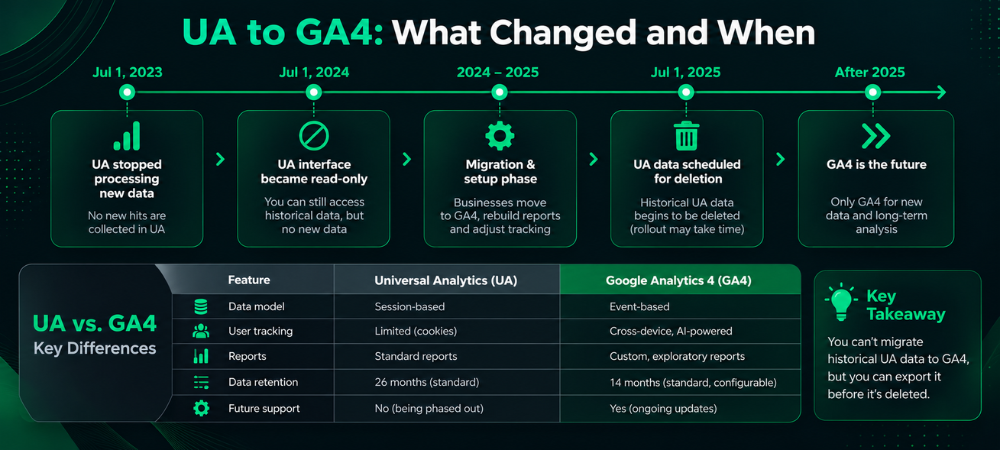
If your team downloaded reports, built a Looker Studio dashboard, or exported to BigQuery before mid-2024, that data still exists. It’s just wherever you saved it, not inside GA4, and it never will be.
| Is My Universal Analytics Data Really Gone For Good? Yes, unless someone exported it before Google deleted it. Standard UA stopped collecting new data on July 1, 2023. Google shut down the UA interface and deleted everything during the week of July 1, 2024. |
The GA4 Data Retention Trap Most Teams Don’t Catch In Time
Here’s a wrinkle a lot of “UA to GA4” content skips entirely: GA4 has its own retention limits. If nobody checks them, you can end up losing GA4 data the same way you lost UA data.
By default, GA4 keeps event and user-level data for only 2 months. You can extend that to 14 months on a standard property under Admin > Data Settings > Data Retention. Do it immediately: the change only protects data going forward, not data that has already aged out.
Here’s the part most people miss: this limit only affects Explorations, the custom, funnel, and path-analysis reports. Standard reports like Traffic Acquisition and Pages and Screens run on aggregated data that GA4 keeps without an expiration date. A two-year-old traffic trend can still show up fine in a standard report. The same period comes up empty the moment someone tries to build a custom segment in Explorations.
If you need data beyond 14 months for granular analysis, export it to BigQuery. Google’s free tier covers most small-to-midsize sites, and it stores raw event data with no retention ceiling at all.
Not sure whether your property is even configured correctly? That’s a two-minute check during a proper technical audit. It’s cheap to fix now and expensive to fix in fourteen months.
| How Long Does GA4 Keep My Data? Event and user-level data used in Explorations defaults to 2 months, and you can extend it to 14 months on a standard property. Standard reports aren’t affected by this limit and use aggregated data GA4 keeps indefinitely. Anything beyond 14 months needs a BigQuery export. |
What To Do Now, Whether You Exported Your UA Data Or Not?
If you exported UA reports before the 2024 cutoff: treat that file as an archive, not a live source. Load it into a Looker Studio report alongside your GA4 data. Stakeholders get a before-and-after view, without expecting the two data sets to line up into one continuous timeline.
If you never exported anything: accept the gap and say so plainly to whoever asks for year-over-year numbers. Rebuild what you can from Search Console, ad platform data, and CRM records. Set the expectation that clean GA4 comparisons start from your GA4 launch date, not further back.
Either Way, Do These Three Things This Week:
- Audit your GA4 key events against what you used to track as UA goals. Enhanced Measurement catches a lot automatically, but not everything, and gaps here quietly break conversion reporting.
- Fix your data retention settings, as covered above, before more data ages out under the 2-month default.
- Document your GA4 setup properly this time: custom events, audiences, and how each one connects to a business goal. Recreating conversion tracking is also a good moment to revisit your CRO and funnel optimization setup. The events you choose to track shape what you can optimize later.
None of this recovers the data you lost. It does stop the same thing from happening again.
| Should I Keep My Old UA Export Files If I Still Have Them? Yes. You can’t load them into GA4, but those exports stay useful for year-over-year comparisons and long-term trend reporting. Just store and reference them outside the GA4 interface. |
Where This Leaves You
The myth persists because the loss feels avoidable in hindsight; it wasn’t. GA4 was never going to inherit UA’s history, no matter how early anyone switched over. The real work now is making sure your current GA4 setup doesn’t repeat the same problem. That means correct retention settings, a documented event structure, and an honest conversation with anyone who expects a kind of reporting continuity GA4 doesn’t provide.
Want help checking your GA4 setup, retention settings, or broader digital marketing reporting? That’s exactly the kind of gap we close for clients.