You recently migrated your website and suddenly see your organic traffic tank. You start to panic and wonder why this happened when you’ve spent months doing SEO on your site.
Don’t worry; website migration can tank organic traffic. But this is not permanent. Google needs time to recrawl and reindex your website. So the dip you see is usually due to various issues with website migration.
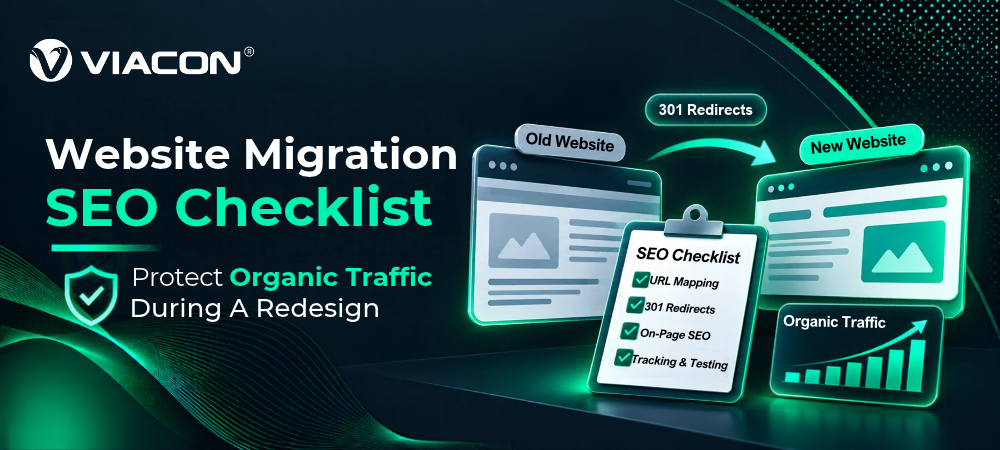
A website migration SEO checklist helps you identify these issues and avoid drastic changes during migration. This guide breaks it down into 3 phases: before, during, and after.
Let us dive right into it.
Why Does Website Migration Cost Traffic?
SEO Website migration often worries businesses because it can negatively impact organic rankings. But you may ask, ‘If I already have good rankings and traffic, then why do search engines reduce my visibility during a migration?’
The answer is simple: When you migrate your existing website, search engines have to re-crawl and re-establish your site. As migration is an SEO communication event, small issues can cause indexing problems, crawl inefficiencies, or traffic drops.
The Reasons May Include:
- Missing 301 redirects
- Re-indexing time lag
- Irrelevant landing page
- No baseline crawl data for comparison
- Misconfiguration of canonical tags
- Outdated XML sitemaps
- Not analyzing log files during rollout
- Redirection of crawl budgets toward low-priority pages
| What Does Website Migration Mean? Website migration is the process of moving an existing website from one environment to another. Common types of website migration include moving from HTTP to HTTPS, platform or CMS migration, and domain migration, or hosting migration. |
Website Migration SEO Checklist: What To Do Before Migration?
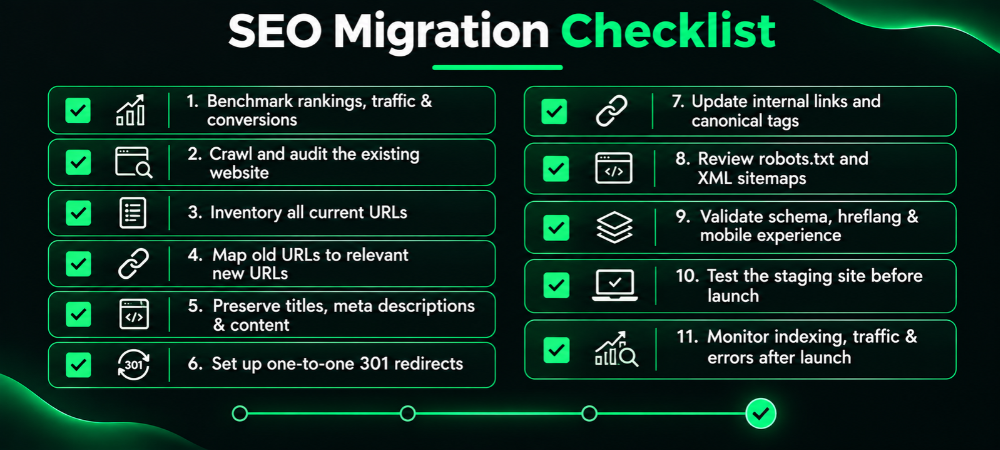
The concern you have is justified. Even Google has said, ‘You may experience ranking fluctuations while Google recrawls and reindexes your site.’ So, how do you ensure that your traffic doesn’t drop significantly? Follow the 11-point website migration SEO checklist before you start.
1. Benchmark Your Organic Traffic
First, you need a clear idea of what your organic traffic looks like before migration. Google Search Console is your best friend in this first step. This benchmark will serve as a baseline for you to compare your traffic post-migration.
For example, suppose your website receives 150K traffic monthly and has 70 keywords ranking in the top 3. This serves as your baseline. When you complete migration, you can compare your new traffic and measure how much (if any) traffic loss your website is facing.
Semrush Suggests That You Track These Key Benchmarks Before Migration:
- Top-performing landing pages.
- Indexed pages for the past 30 to 90 days.
- Total organic sessions.
- Click-through rate (CTR).
- Core web vitals.
- Backlinks to key pages.
| How Can Businesses Minimize Traffic Loss During A Migration? Businesses can prevent or minimize traffic loss by following a detailed website migration SEO checklist. Create a comprehensive URL mapping plan, test a staging environment, conduct a pre-migration SEO audit, and schedule the migration during a low-traffic window. For a complicated migration, Viacon’s SEO services ensure that critical SEO elements are preserved throughout the transition. |
2. Crawl And Inventory The Existing Website
Just as you need to pack up and make a list of things before you move houses, you need to do the same during a website migration. Without this, you will be left confused when you encounter broken redirects, content discrepancies, or indexing issues after launch.
You can use Botify, Screaming Frog SEO Spider, Sitebulb, or Ahrefs Site Audit to identify image assets, internal links, indexable URLs, header tags, canonical URLs, and status codes.
A common mistake is assuming the CMS contains all URLs. However, CRM exports often miss legacy landing pages, orphan pages, URLs accessible through redirects, and more. Without these, your site’s link equity may drop.
3. Export Top-Performing Assets
Perhaps one of the most important points in this website migration SEO checklist is exporting top-performing assets. What are those? Any URLs or assets that significantly contribute to organic visibility, conversions, or user engagement.
For example, these could be your high-ranking pages, lead-generating landing pages, pages with strong backlink profiles, downloadable resources, or images and videos.
Ejaz Ahmed, COO and COD at Viacon, says, “Many businesses only focus on exporting URLs while overlooking downloadable assets such as whitepapers, PDFs, ebooks or case studies. Removing or deleting these resources without proper redirects can lead to loss of backlinks, referral traffic and rankings, which may have taken years to build.”
You can use Google Analytics 4 (GA4), Ahrefs, Semrush, or Google Search Console to understand which pages generate the most traffic and conversions. According to Google Search Central, properly redirecting moved URLs helps preserve signals associated with those pages. This helps search engines migrate value from the old site to the new one.
4. Audit Backlinks
This next website migration SEO checklist is essential to prevent severe drops in organic traffic. SEO experts recommend periodically auditing backlinks, and it becomes especially important during a website migration.
You can use backlink analytics to spot low-quality links pointing to your site and remove them. This helps ensure your new domain isn’t associated with spammy links and avoids search engine penalties.
5. Map Old URL To New URL
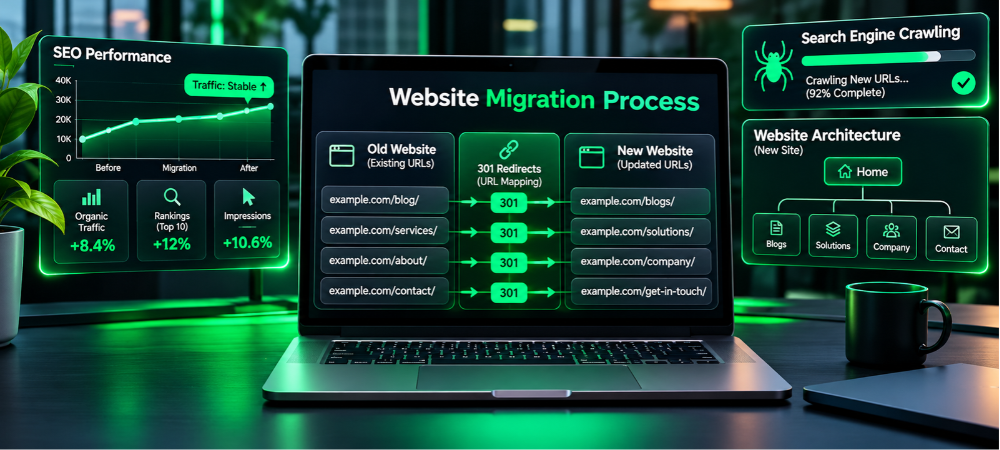
Now comes the most important part of your website migration: URL mapping. In this stage, you need to build a spreadsheet or database that matches every existing URL to its new destination.
However, do not do this randomly. The old pages and new pages should have matching user intent. A common mistake is redirecting all existing URLs to the homepage. This could cause you to lose SEO rankings and link equity.
Why this matters: Google says a solid URL mapping helps crawlers understand where content has moved and transfer signals from old to new URLs.
6. Implement Permanent (301) Redirects
After URL mapping, implement redirect mapping. This is a permanent server-side redirect that will automatically send users to the new URL. You may have seen some webpages stating ‘Redirecting in 5,4,3, 2,1’. That is a permanent redirect in action.
It preserves rankings, backlinks, and organic traffic. At Viacon, we ensure your redirects are done strategically, not arbitrarily.
A Well-planned Strategy For This Includes:
- Redirecting every URL to its most relevant replacement page.
- Preserving high-value backlinks.
- Supporting search engine reindexing efforts.
- Eliminating redirect chains and loops.
- Ensuring users land on expected content.
| How Long Should Redirects Remain Active After A Website Migration? According to Google’s official guide, redirects should remain active for at least 12 months after you complete the migration. This gives search engine bots enough time to crawl, find, and reindex all updated URL structures. |
7. Maintain Existing SEO Metadata
A lot of people tend to look just at URLs and redirects when migrating a site. But SEO metadata is just as important, as search engines consider meta descriptions, meta titles, image alt text, and heading tags to understand and rank your content.
Search engines drive around 51% of all website traffic (as reported by Deloitte Digital), so on-page SEO is worth protecting. This helps ensure your website is visible and indexed.
To avoid losing your current search position, save and export your metadata and other SEO-heavy elements. Then import them into the relevant pages. If you are redesigning your website, don’t rewrite meta tags without keyword research.
8. Verify Canonical Tags
Canonical tags are a snippet of HTML code that tells search engines which version of a webpage is preferred. So, during migration, these canonical tags may be accidentally deleted, configured incorrectly, or duplicated, leading to inconsistencies in crawling and indexing.
Before migrating, verify the following: every indexable page should have a self-referencing canonical tag; it should not reference old URLs; it should point to the correct live page; and product or category pages should follow proper canonical configuration.
9. Preserve Structured Data
You have done your URL mapping, website crawling, and 301 redirects. But that may still not be enough. Before migration, don’t forget to preserve structured data. This helps search engines understand your content and improves your eligibility for rich results such as FAQs, breadcrumbs, and reviews.
Here are the main structured data types that you should verify: product schema, article schema, FAQ schema, breadcrumb schema, review and rating schema, and video schema.
10. Test the Staging Environment
Lastly, test your staging environment (a private replica of your new website) with all the things you learned in this website migration SEO checklist. Go beyond just visual inspection. You must run a complete SEO audit of the staging site to verify that the elements can be implemented correctly.
11. Migrate First, Redesign Later
Google recommends moving your site in bits and pieces instead of doing it all at once. This way, you can test your move and minimize problems. Also, keep your website migration and website redesign projects separate. This way, you can focus on one thing and avoid the chances of tanking your organic traffic.
| Should I Redesign My Website Before Migrating? One of the most common reasons for traffic loss is combining website migration with website redesign. So migrate your website as-is, stabilize the new URLs, verify, and then redesign. |
Website Migration Checklist: What To Keep In Mind During Migration?
Now that you understand the basics of a website migration SEO checklist, let’s move on to the process. Here are the things to keep in mind during your migration process:
1. Deploy Redirects Immediately
This is perhaps the most important part during your website migration. Once you start launching the new website, deploy 301 redirects immediately. If you don’t, users may encounter broken pages. Moreover, crawlers may encounter non-existent URLs before the new ones, which can reduce indexing efficiency.
2. Submit Updated XML Sitemaps
Redirects are great starting points during your migration. But submitting an updated XML sitemap ensures search engines know your new website’s structure. Submit a fresh sitemap through Google Search Console or Bing Webmaster Tools. This can help crawlers discover your migrated content faster.
3. Remove Noindex Tags Before Launch
Your staging environment is protected from crawlers with a noindex tag. This lets you test and verify elements without making changes permanent. However, if you don’t remove it at launch, it will not get indexed at all. So check the page source code, robots meta tags, and CMS settings before launch.
4. Verify Internal Links
During launch, an internal linking audit is essential. These help search engines discover pages, understand site structure, and distribute ranking authority across the site. A migration often breaks these links, and as a result, both search engines and users may face problems. So, update footer links and other navigation during your launch.
5. Use Change Of Address Tools
This website migration SEO checklist is essential if you are moving from one domain to another. When your new website is live, you must notify search engines that your business is now associated with a new URL, rather than treating you as a completely different website. You can use the Google Search Console Change of Address Tool for the same.
6. Check Robot.txt
Lastly, run a robots.txt audit to ensure search engines can properly access your website URLs. It should verify that your XML sitemap locations are properly referenced, new website directories are not unintentionally disallowed, CSS, JavaScript, and image resources are accessible, and staging environment directives are removed.
A professional SEO services organization such as Viacon can help you navigate the complex process of website migration. Contact us today!
Website Migration Checklist: Things To Do After Migration
You are in the last phase of your website migration process. Yet, it is where experts put their hands over their heads. The website migration SEO checklist for after migrating your site is below:
- Fix Any Redirect Gaps: It is common to see some redirect gaps even after URL mapping. After migrating to a new website, audit your redirects and prioritize pages with organic traffic.
- Monitor Organic Traffic: Migration monitoring is essential. Monitor organic traffic daily and weekly and compare it to your baseline. However, remember that some fluctuations are normal.
- Audit Index Coverage: Regularly monitor Google Search Console’s Indexing and Pages reports to ensure search bots crawl important pages correctly. Experienced SEO experts do this every week for a month.
- Recover Backlinks: Backlinks are one of the most important assets during a migration. Maintain a list of backlinks and contact referring websites after migration to update outdated links.
- Monitor 404 Errors And Crawl Failures: Look for broken internal links, 500 server errors, orphan pages, and 404 errors immediately after migration. If you find these, you need to fix them immediately for search bots to crawl and index your new URL.
| How Long Does It Take For SEO Rankings To Recover After A Website Migration? The answer depends on the website’s size and the type of migration you performed. However, in general, it may take 2 weeks to more than 3 months to recover SEO rankings. |
Tank Your Organic Traffic With Website Migration SEO Checklist
A website migration SEO checklist helps you identify the issues that may tank your organic traffic and prevent it from happening. Viacon’s professional SEO and digital marketing services help businesses make the transition without dipping their traffic. Contact us before you revamp your website.
Start by creating a baseline and crawling your entire website, then slowly move toward the migration. Remember, you don’t have to migrate and redesign at the same time. Instead, migrate in bits and pieces, then do the redesign if you need it.