Your website traffic fell, and the obvious suspect is Google. Sometimes that’s right. Just as often, the cause is a broken analytics tag, a robots.txt change from last Tuesday’s release, a seasonal dip, or an AI answer that now sits above your listing.
This guide gives you an order of operations. You will confirm the drop is real, find out whether rankings or clicks fell, match the pattern to one of 12 known causes, and work through a 30-day plan. It reflects Google’s 2026 update history and the latest AI Overview data, so you can carry it into 2027 planning.
Short Answer: When website traffic suddenly dropped, the cause is almost always one of four things: tracking broke, rankings fell, rankings held but fewer people clicked, or Google stopped indexing some pages. Compare impressions, clicks, click-through rate (CTR) and average position in Search Console before and after the drop date. The pattern points to the cause.
Start With The Data: Is Your Website Traffic Drop Real?
Check the numbers before you touch a page. Some drops are measurement errors, and fixing the wrong thing costs you weeks.
Google Analytics 4 (GA4) and Google Search Console count different things. GA4 counts sessions on your site, and only the ones its tag records. Search Console counts clicks from Google Search results, whether or not the visitor’s browser ever loads your tag. The two will never match exactly, but they should move in the same direction. When they disagree, that disagreement is your first clue.
| What you see | What it usually means |
|---|---|
| GA4 organic sessions down, Search Console clicks flat | A tracking or attribution problem: a removed tag, a consent banner change, or redirects that strip referrer data |
| Both down, impressions down | Lost visibility from rankings, indexing or search demand |
| Both down, impressions steady | Lost clicks from a weaker snippet, a new SERP feature or an AI Overview |
A real website traffic drop shows up in both tools. Next, find the start date. Open the Search Console Performance report, set the range to 16 months, and read the daily chart. Note the first day clicks fell, then line that date up against three things: your release and plugin log, the Google Search Status Dashboard, and the same dates last year. A drop that begins the day you launched a redesign is rarely a Google story.
If you would rather hand this over, an SEO services team will run the same checks. You can complete the first pass yourself in an afternoon.
What Is The Difference Between GA4 Traffic And Search Console Traffic?
GA4 reports sessions recorded by your site’s tag, from every source. Search Console reports clicks from Google Search results only, measured on Google’s side. Ad blockers, consent settings and broken tags make GA4 undercount, so a gap between the two usually points to tracking rather than rankings.
How Can I Tell If The Drop Is Seasonal?
Compare the same weeks last year in Search Console, then check Google Trends for your main topics. If last year shows the same dip and interest in the topic fell, you are seeing demand, not a penalty. Always compare year over year, because week-over-week comparisons exaggerate normal swings.
Ranking Drop Or Click Drop? Read Search Console First
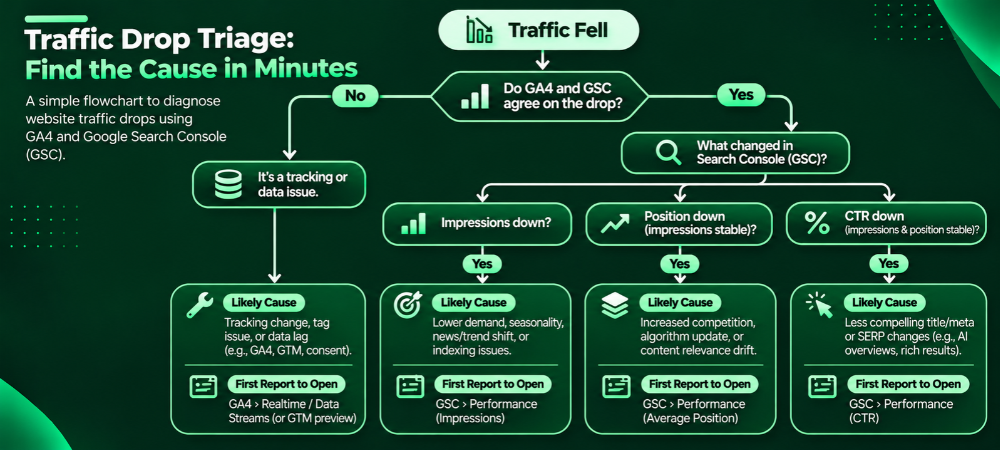
An organic traffic decline comes down to four numbers: impressions, clicks, CTR and average position. Compare the 28 days before the drop with the 28 days after, then match what you see to the table. Search Console shows why website traffic changed far more clearly than GA4 does.
| Impressions | Position | CTR | Likely diagnosis | First step |
|---|---|---|---|---|
| Down | Down | Flat or down | Ranking loss: an update, stronger competitors or content decay | Compare lost pages and queries, then review search intent |
| Down | Flat | Flat | Lost demand or indexing problems | Check Google Trends and the Page indexing report |
| Flat or up | Flat | Down | Click loss: an AI Overview, a new SERP feature or a weak title | Search the top lost queries by hand |
| Flat | Down on a few pages | Down | A partial ranking loss | Segment by page group and template |
Segment before you conclude anything. Split the data by page, query, device and country. Filter out branded queries to see whether your non-brand visibility dropped, because a strong brand can hide a decline in discovery traffic.
Can Website Traffic Fall While Rankings Stay The Same?
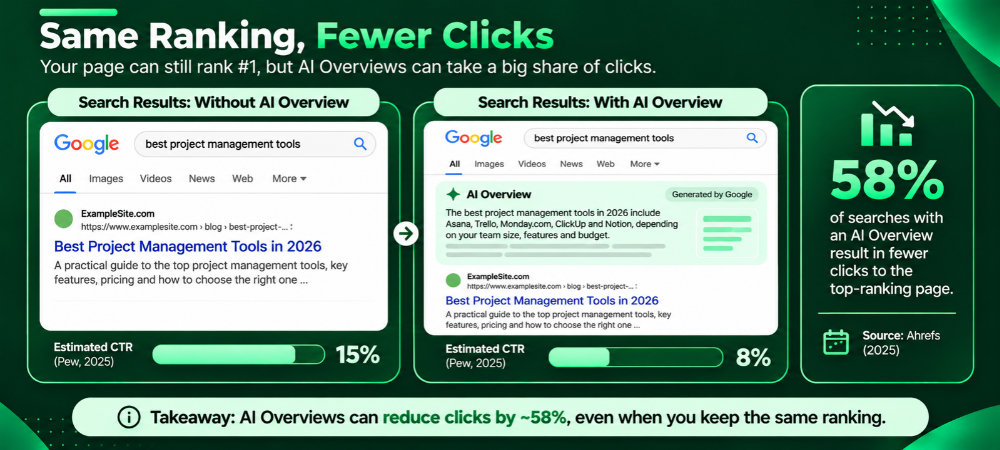
Yes. Rankings measure where your link sits, not how many people click it. An AI Overview, featured snippet, video carousel or extra ad can push your result down the screen while your listed position stays the same. Impressions hold, CTR falls, and sessions follow.
12 Causes Of Organic Traffic Decline And How To Confirm Each
The table lists the causes behind most cases of SEO traffic loss. Shortlist two or three suspects that match your pattern, then work through the sections that follow.
| Cause | What you will see | Where to check |
|---|---|---|
| Core update reassessment | Drop starts inside a confirmed rollout window; broad query losses | Search Status Dashboard, Search Console |
| Spam update or manual action | Sharp drop; a message in Search Console | Manual actions and Security issues reports |
| Broken or changed tracking | GA4 falls, Search Console stays flat | Tag Assistant, GA4 Realtime |
| Seasonality or falling demand | The same dip appears last year | Year-over-year view, Google Trends |
| Indexing or crawl problems | Indexed pages fall, errors rise | Page indexing, Crawl Stats |
| Site changes: migration, redirects, noindex, canonicals | Drop begins on release day | Release log, URL Inspection |
| Slow or unstable pages | Core Web Vitals fail after a redesign or plugin change | PageSpeed Insights, Search Console |
| Content decay | Older pages lose clicks steadily over months | Performance report by page |
| Intent shift or stronger competitors | Rankings slip and the top results look different | Manual review of the results page |
| AI Overviews and zero-click search | Impressions steady, CTR down | CTR by query, manual results check |
| Lost backlinks or weaker internal linking | Referring domains fall; orphan pages appear | Backlink tool, site crawl |
| Scaled, low-value pages | Many near-duplicate or thin pages, rising “crawled, not indexed” | Content audit, Page indexing |
Rule out the cheap causes first. For tracking (cause 3), confirm the GA4 tag fires on your key templates. For seasonality (cause 4), run the year-over-year check. Cause 7 tends to arrive with redesigns and plugin updates, and our guide to website speed and performance covers the fixes.
Did A Google Update Cause Your Google Ranking Drop?
Google’s December 2025 core update began on December 11 and took 18 days. The 2026 calendar has been just as busy:
| Update | Dates | Notes |
|---|---|---|
| February 2026 Discover core update | Feb 5 to 27 | English-language Discover only |
| March 2026 spam update | Mar 24 to 25 | The shortest named update on the dashboard, about 20 hours |
| March 2026 core update | Mar 27 to Apr 8 | 12 days |
| May 2026 core update | May 21 to Jun 2 | About 12 days |
| September 2026 spam update | Sep 24 to Oct 8 | Google’s fourth spam update of the year |
At the time of writing, no core update has started since May. Check the Google Search Status Dashboard for anything newer.
Core updates and spam updates do different jobs. A core update changes how Google weighs relevance and quality across the web. Your pages can lose rankings because other pages now answer the query better, with no violation on your side.
Spam updates and manual actions enforce Google’s spam policies, which cover scaled content abuse, site reputation abuse, expired domain abuse and link spam. A manual action appears in Search Console’s Manual actions report. An algorithmic spam demotion does not, so you infer it from timing and from what your site does.
To test whether an update caused your Google ranking drop, follow Google’s guidance. Wait at least a full week after the rollout is confirmed complete, then compare that week with the week before the rollout began.
For the May update, that means comparing roughly June 3 to 9 against May 14 to 20. If your clicks fell before May 21 or after June 2, the update is probably not your cause.
Is A Core Update A Penalty?
No. A core update re-ranks pages by comparing them with everything else Google can show, so you can lose rankings without breaking a rule. Penalties come from spam policy enforcement, through manual actions or spam updates, and those usually trace to a clear cause such as manipulative links or mass-produced pages.
How Long Does Website Traffic Recovery Take After A Google Update?
Plan in months, not days. Google has said its systems can take time to reflect improvements, and sites often see their largest gains at a later core update. Technical fixes can show results within weeks. Nobody can promise a date, so be wary of anyone who does.
Technical SEO And Indexing Checks For Sudden SEO Traffic Loss
Technical faults leave a different shape than content problems. They cut traffic sharply, often on a single day, and hit whole templates or folders. Content decay is slower and spreads page by page. If your chart looks like a cliff, start here.
- Page Indexing report: Compare indexed and non-indexed counts over time. Read the reasons: “Crawled, currently not indexed,” “Excluded by noindex,” “Blocked by robots.txt,” “Duplicate, Google chose a different canonical,” soft 404s and server errors.
- URL Inspection: Run a live test on your top lost pages. Confirm Google can fetch them, the rendered HTML contains your content, and the selected canonical matches yours.
- robots.txt And Meta Tags: Staging rules often reach production. Check for a sitewide noindex, a Disallow on a key folder, or an X-Robots-Tag header.
- XML Sitemap: Submit only live, indexable, canonical URLs. Remove redirects and 404s, then compare submitted against indexed.
- Crawl Stats: Look for 5xx spikes, slow server responses or host availability problems.
- Redirects: After a migration, confirm old URLs map one to one to new ones with 301s. Fix chains, loops and leftover 302s.
- JavaScript Rendering: If rendered HTML lacks your main content, Google may see an empty page.
- Internal Links: Crawl the site for orphan pages and key pages that lost links in a navigation change.
- Core Web Vitals: Aim for LCP under 2.5 seconds, INP under 200 milliseconds and CLS under 0.1, at the 75th percentile of real users.
- Security And Manual Actions: Open both reports. Hacked sites often carry injected spam pages that damage rankings unnoticed.
For a deeper walkthrough of crawl and render problems, see our technical SEO guide.
Why Did My Pages Drop Out Of Google’s Index?
The usual causes are a noindex tag or robots.txt block shipped from staging, canonical tags pointing at another URL, server errors during crawling, soft 404s, or pages Google crawled and judged not worth indexing. The Page indexing report names the reason for each URL, so start with the largest group.
Content Quality, Search Intent And Competitors
When the drop is gradual or lines up with an update, the pages themselves become the suspect. Google folded its helpful content system into its core ranking systems in March 2024, so no separate switch exists to flip. Google’s guidance says its core systems mostly assess individual pages, while some signals apply across a whole site. In practice, one weak page will not sink a domain. A large share of thin, outdated or search-first pages can still drag down how the rest perform.
Audit Your Top 20 Pages By Lost Clicks, And Ask Four Questions Of Each:
- Does The Query Still Want This Type Of Page? A search for “best project software” may now return comparison tools and review pages, not a blog post.
- Is The Page Outdated? Check statistics, screenshots, prices and dates.
- What Do The Top Three Results Offer That Yours Doesn’t? Look for first-hand testing, original data, clearer structure or a faster answer.
- Does The Page Show Who Wrote It And Why They Know The Topic? Our guide to E-E-A-T explains the trust signals worth adding.
Then choose one action per page: update it, merge it into a stronger page, redirect it, or leave it alone. This is where most organic traffic decline gets reversed, and it is slower and less exciting than a technical fix.
Do Dwell Time, Scroll Depth And Bounce Rate Decide Rankings?
Not the way many guides claim. Google representatives have said repeatedly that analytics metrics such as bounce rate and time on page are not ranking signals. Testimony in the US antitrust trial against Google described a system called Navboost, which learns from clicks and other interactions on results pages. The practical reading: pages that satisfy the query keep earning clicks. Use your engagement numbers to diagnose problems, but do not expect to lift rankings by improving them directly.
Can AI-generated Pages Cause An Organic Traffic Decline?
They can. Google does not penalize content for being AI-assisted, but its spam policy on scaled content abuse targets many pages produced mainly to manipulate rankings, however they are made. Hundreds of near-identical pages with little original value tend to be indexed slowly, rank poorly, and, in bad cases, get demoted.
Should I Delete Old Blog Posts?
Not by default. Remove or redirect pages with no traffic, no links and no purpose. Update or merge pages that still have impressions, because they carry history Google already knows. Deleting a post that earns links and rankings throws away that history for nothing.
AI Overviews And Zero-Click Search: When Rankings Hold But Clicks Don’t
Several studies now measure what happens when an AI Overview appears above the organic results:
- Pew Research found people clicked a traditional result in 8% of visits with an AI summary, against 15% without one.
- Ahrefs measured a 58% drop in position-one CTR on keywords that trigger AI Overviews, in its December 2025 update covering 300,000 keywords.
- A randomized field experiment posted to SSRN in April 2026 found that AI Overviews cut outbound organic clicks by roughly 38 to 40 percent on queries where they appeared. It is a working paper and has not completed peer review.
- SparkToro’s analysis of early 2026 data put US Google searches that end without a click at roughly two-thirds.
Methods differ, so treat the exact figures as a range. The direction does not vary. Informational queries lose the most, while branded, local and high-intent transactional queries lose less.
How To Measure It: Search Console counts AI Overview and AI Mode clicks and impressions inside the Web search type, and you cannot filter them out of the main report. In 2026, Google added a Generative AI performance report that shows impressions for your pages inside those features. It reports impressions only, and it is a filtered slice of data already in your Web totals, so never add the two together. Then do the manual check. Take the 20 queries that lost the most clicks, search each in a logged-out browser, and note whether an AI Overview appears and whether it cites you.
What To Change:
- Judge informational pages by impressions, assisted conversions and branded search growth, not sessions alone.
- Build pages an AI summary cannot fully replace: original data, hands-on comparisons, calculators, pricing and local detail.
- Open each section with a direct answer, then support it. Searchers and AI systems can both lift it cleanly.
- Track AI referrals. In GA4, create a custom channel group that matches sources such as chatgpt.com, perplexity.ai, gemini.google.com and copilot.microsoft.com. Volumes are often small, but they show which pages AI systems cite.
These tactics fall under generative engine optimization, which our AI search optimization service covers in depth.
Are AI Overviews Causing My Website Traffic Loss?
Possibly, if impressions are steady, average position is stable, and CTR fell on informational queries that now show an AI Overview. If impressions and positions fell too, look at rankings, indexing or an update first. Many sites suffer from both at once, so segment by query type before you decide.
How The Pattern Differs By Site Type
Service Businesses rely on a handful of high-value pages, so one lost ranking shows up in leads fast. Check those pages first, and compare them with competitors who explain the problem before they sell.
Ecommerce Stores usually lose ground to thin product copy, duplicated manufacturer descriptions, faceted-URL bloat and AI Overviews on buying-guide queries. Check that product and category URLs are indexed before you rewrite any copy.
Blogs And Publishers in crowded topics feel AI Overviews hardest on informational queries. Original research, a clear point of view and depth beat volume.
Local Businesses should review Google Business Profile changes, review volume and proximity results alongside web rankings. Our local SEO strategy guide covers those signals.
Your 30-Day Website Traffic Recovery Plan
Use this order. It puts verification and cheap fixes ahead of rewrites, so you stop adding variables to a problem you have not yet isolated.
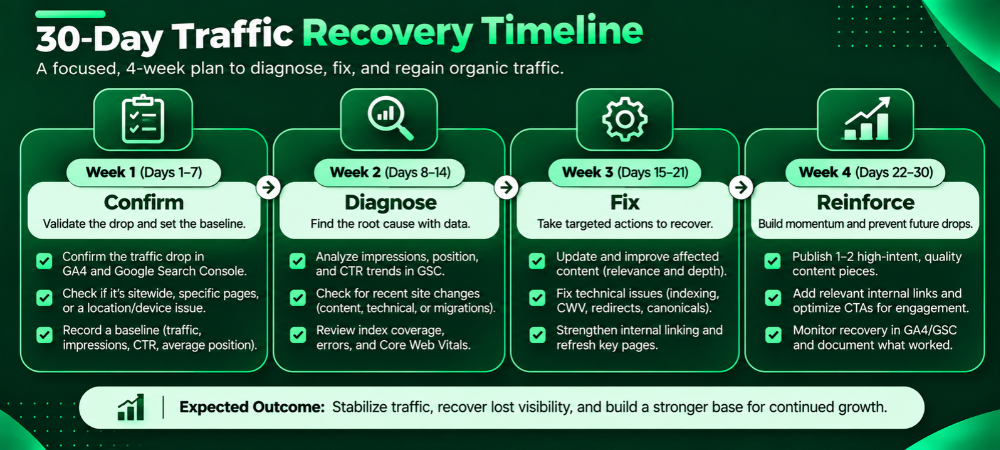
Week 1 (days 1 to 7): Confirm And Contain
- Confirm the drop in GA4 and Search Console. Record the start date and the loss in clicks and conversions.
- Open the Manual actions and Security issues reports.
- Fix tracking faults first, so every later number can be trusted.
- Review the Page indexing and Crawl Stats reports for sharp changes.
- Pause non-essential site changes and start a change log.
Week 2 (days 8 to 14): Diagnose
- Export lost clicks by page and by query, then group pages by template and topic.
- Review the live results for your top 20 lost queries. Note AI Overviews, new competitors and changed result types.
- Run a full crawl for status codes, redirects, canonicals, noindex tags and orphan pages.
- Check Core Web Vitals field data on your main templates.
- Place each affected page in one bucket: technical fault, outdated, intent mismatch, SERP click loss, or normal fluctuation.
Week 3 (days 15 to 21): Fix In Order Of Impact
- Repair technical faults first: robots rules, noindex tags, canonicals, redirects and server errors.
- Update the 10 to 20 pages with the biggest lost clicks. Add current data, first-hand detail and a direct answer near the top.
- Merge near-duplicate pages and 301 the weaker ones to the stronger.
- Rewrite titles and descriptions where CTR fell but position held.
- Add internal links from your strongest pages to the updated ones.
Week 4 (days 22 to 30): Reinforce And Set A Baseline
- Submit the updated sitemap and use URL Inspection to request indexing for the most important fixed pages.
- Promote the updated pages through outreach, your newsletter and relevant communities to earn fresh links and mentions.
- Build a dashboard of clicks, impressions, CTR and indexed pages, with weekly snapshots.
- Save today’s numbers as the baseline for judging the next Google update.
- Schedule a quarterly refresh for the pages that earn the most traffic.
If you want an outside view of weeks 1 and 2, you can request a Viacon website audit.
What To Expect: Technical fixes often show in Search Console within days to a few weeks, once Google recrawls the pages. Quality improvements take longer, and some wait for the next core update. A drop caused by AI Overviews may never fully reverse, so the goal shifts to earning more from the clicks that remain.
Five Moves That Make Things Worse:
- Disavowing links without evidence of a link-spam problem.
- Deleting dozens of pages in one go.
- Rewriting the whole site at once, which makes it impossible to see what worked.
- Changing titles on pages that did not drop.
- Publishing batches of AI-written pages to “replace” lost traffic.
A Website Traffic Recovery Example From Viacon
Editor’s Note: Every bracketed item below is a placeholder. Replace it with real, approved client data before publishing, and keep the client anonymous. Do not publish estimates as results.
The site: [Industry], [business model], roughly [number] indexed pages, [main traffic source].
What Happened: On [date], organic clicks fell [X]% in [Y] days. Search Console showed [pattern across impressions, position and CTR]. GA4 showed [pattern].
Diagnosis: [Which causes from the table above, and the evidence that confirmed each.]
What We Changed:
- [Fix one, with date]
- [Fix two, with date]
- [Fix three, with date]
Result: After [30] days, [metric and change]. After [90] days, [metric and change]. [One sentence on what did not recover, and why.]
What we would do differently: [One honest lesson.]
Visual suggestion: A weekly-clicks line chart with an annotation at the drop and one at each fix, so readers can connect actions to results.
More client work is in our case studies.
What To Do Next And What To Plan For In 2027
Start today with three actions. Confirm the drop in GA4 and Search Console, match your pattern to the table of causes, and write down the first date clicks fell. Those steps rule out most wrong theories within an hour.
For 2027, plan around change instead of hoping for stability. Google has averaged a little more than three core updates a year recently, and 2026 added four spam updates. Take a Search Console baseline each quarter, annotate every site release, and review AI Overview exposure on your top queries. A team that tracks clicks, impressions and conversions together will spot a Google ranking drop in days, not months. Our SEO trends for 2027 break down where search is heading.
When a drop looks complicated, or the revenue at stake is high, Viacon’s SEO team can run this diagnosis alongside yours.