A customer who reaches your payment page has already decided to buy. What happens in the next thirty seconds depends almost entirely on how well your payment setup is built. A slow redirect, a UPI request that hangs, or an order that never updates after money leaves the buyer’s account can cost you the sale and a support ticket on top of it.
That is why ecommerce payment gateway integration deserves more than a plugin install. It is the connection between your store, your order system and the banks and networks that move money. Done well, it is invisible. Done badly, it produces failed orders, duplicate charges and weeks of reconciliation work.
This guide is written for founders, product managers and developers who run or plan an online store in India. It covers how the technology works, how to integrate a gateway step by step, which payment methods to support, what to test, what it costs, and where teams go wrong. Where we cite regulation, we point you to the source, because rules in this area change.
What Is Ecommerce Payment Gateway Integration?
What Is Ecommerce Payment Gateway Integration?
Ecommerce payment gateway integration is the process of connecting your online store to a payment provider so customers can pay, your system can confirm the payment, and money can be settled to your bank account. It includes the checkout screen, the server code that creates and verifies payments, status notifications, refunds and reconciliation.
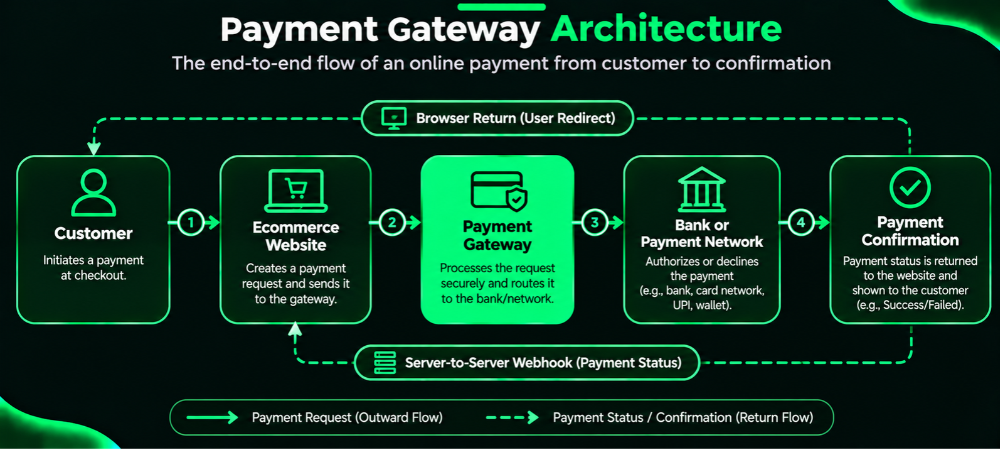
Think of the gateway as the secure messenger between three parties. Your website sends it an order amount and a reference. The gateway passes that request to the customer’s bank or UPI app through the relevant payment network. The bank answers, the gateway relays the result, and your server updates the order.
Four steps matter most:
- Authorisation: The customer’s bank or UPI app approves the payment.
- Confirmation: The gateway tells your server the final status.
- Settlement: The money reaches your bank account, usually after a delay set by your provider’s terms.
- Refunds And Reconciliation: You return money when needed and match every payment against your orders and bank statements.
Integration matters because payment is the one step in your store where a bug costs real money. A product page that loads slowly is annoying. A payment that succeeds at the bank but fails to mark the order as paid creates an angry customer and a manual fix. If you plan a store build or a payments rebuild, our ecommerce website development services team treats payments as core architecture, not a late add-on.
Payment Gateway vs Payment Aggregator: What Is the Difference?
What Is The Difference Between A Payment Gateway And A Payment Aggregator?
A payment gateway is technology: it captures payment details securely and routes the request to the right network or bank. A payment aggregator is a regulated entity that collects payments from customers on behalf of many merchants, holds the funds briefly and settles them to each merchant. Many Indian providers offer both functions under one product, which is why the terms get mixed up.
The four roles are easy to confuse, so here they are side by side.
| Role | What it does | Example in practice |
|---|---|---|
| Payment gateway | Securely transmits payment data between your store and the payment system | The checkout API and hosted payment page you integrate |
| Payment aggregator | Receives customer payments for multiple merchants, then settles to each merchant | A provider that lets you start accepting payments without your own acquiring arrangement |
| Payment processor | Handles the technical processing of card and bank transactions behind the scenes | The acquiring-side systems that route card transactions |
| Payment network | Provides the rails that carry transactions between banks | Visa, Mastercard, RuPay and NPCI’s UPI |
In India, the Reserve Bank of India (RBI) regulates payment aggregators and sets rules on onboarding, escrow of customer funds, settlement timelines and security. As a merchant, you do not carry the aggregator’s obligations. Your responsibilities sit elsewhere: protecting your own systems, never storing card data you are not permitted to hold, verifying payments on your server and handling orders and refunds correctly.
Read the current RBI directions on payment aggregators on rbi.org.in before you describe any compliance claim to customers, and confirm that your chosen provider is authorised for the activity it performs.
How Does An Ecommerce Payment Gateway Work?
The flow below applies to most gateways, whether the customer pays by UPI, card or net banking:
- The customer adds products to the cart.
- The customer proceeds to checkout.
- Your website creates an order with a unique reference.
- Your server calculates and validates the payable amount. It never trusts an amount sent from the browser.
- The customer picks a payment method.
- Your website starts a payment request through the gateway.
- The gateway routes the request to the relevant channel.
- The bank or payment network processes it.
- The gateway returns a transaction status.
- Your server verifies the payment through the provider’s trusted confirmation method.
- Your website updates the order status.
- The customer receives an order confirmation.
- You receive settlement under your provider’s terms.
Step 10 is where many stores fail. A browser redirect to a “success” page is not proof of payment. Customers can close the tab, lose signal or tamper with a URL. Treat the redirect as a hint, and let your server confirm the result by calling the provider’s order-status API or by validating a signed webhook.
How Do Ecommerce Websites Verify Successful Payments?
They confirm the payment on the server, not in the browser. After the customer returns from the gateway, your backend checks the signature the provider returns, or queries the provider’s API for that order’s status, and compares the amount and currency with your own order record. Only then does the order move to “paid”.
What Is Webhook Integration In Payment Gateways?
A webhook is an automated message the gateway sends to a URL on your server when a payment event happens, such as a payment being captured, failed or refunded. It lets your system learn about the outcome even if the customer never returns to your site. You must verify the webhook’s signature, and you must process each event once, because providers can send the same event more than once.
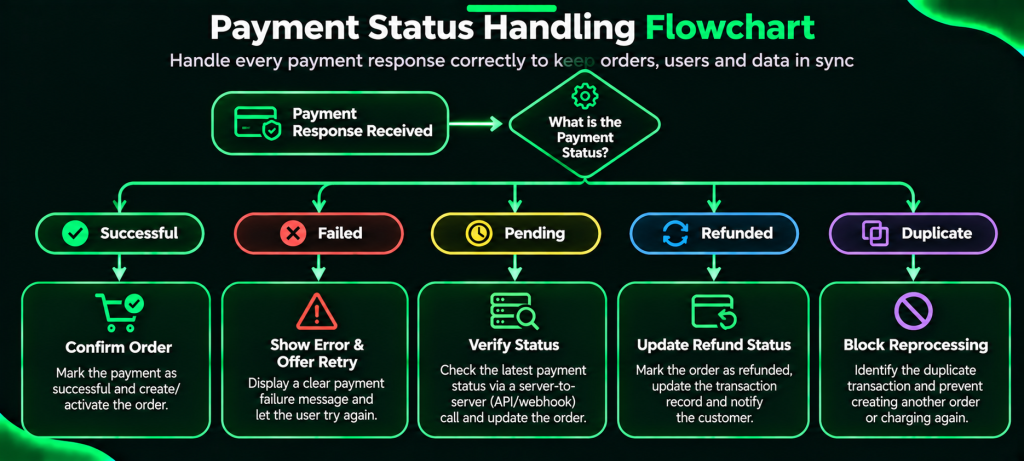
Duplicates deserve special attention. Store the provider’s transaction ID and event ID against each order. If the same ID arrives again, acknowledge it and skip the work. This is called idempotent processing, and it stops one payment from creating two shipments.
Once payments work, the next gain usually comes from the experience around them. Our guide to ecommerce checkout optimization covers layout, form fields and cart abandonment, which we deliberately keep out of this article.
Types Of Ecommerce Payment Gateway Integration
There are five common ways to connect a store to a gateway. Your choice sets how much you build, how much you control and how much security responsibility you keep.
| Method | How it works | Complexity | Customisation | Your security burden | Maintenance | Best for |
|---|---|---|---|---|---|---|
| Hosted checkout | Customer is redirected to the provider’s payment page | Low | Limited (logo, colours) | Lowest, as the provider collects card data | Low | Startups, fast launches |
| Embedded checkout | Provider’s secure fields or modal sit inside your page | Medium | Moderate | Low to moderate | Medium | Growing brands wanting a branded flow |
| API-based integration | Your servers call payment APIs directly; your frontend uses the provider’s secure components | High | High | Moderate to high | Higher | Custom platforms, marketplaces |
| Mobile SDK | Provider’s SDK handles payment screens and UPI app switching inside your app | Medium | Moderate | Low to moderate | Medium, as SDK updates follow app releases | Mobile-first stores |
| Platform plugin | Prebuilt module for WooCommerce, Shopify or Magento | Low | Low to moderate | Low | Depends on plugin updates | Standard stores on supported platforms |
Which Method Should You Choose?
- Startups: Begin with hosted checkout or a trusted plugin. You launch in days and avoid handling sensitive card data.
- Growing Ecommerce Businesses: Move to embedded checkout when branding and conversion tracking start to matter.
- Custom Ecommerce Platforms: Use API-based payment gateway API integration, with the provider’s secure fields for card entry. You gain control over order logic, retries, split payments and reconciliation.
If you run WooCommerce, payment gateway integration for WooCommerce usually means a plugin plus careful webhook setup. Many stores stop at the plugin and skip the webhook, then wonder why some paid orders stay “pending”. Configure both. If you are still choosing a platform, our Shopify vs WooCommerce vs Magento comparison shows which plugin ecosystems suit which kinds of stores.
Payment Methods Indian Ecommerce Businesses Should Support
Which Payment Methods Should An Indian Ecommerce Website Support?
Support UPI first, then cards, net banking and the wallets your audience uses. Add EMI for higher-value baskets and international payments only if your provider has approved you for them. Treat cash on delivery as an order-fulfilment workflow, not a gateway payment. For a wider view of India-specific store requirements, see our guide to essential ecommerce website features in India.
How Does UPI Payment Integration Work?
UPI runs on NPCI’s rails and dominates everyday Indian payments. Two flows matter for merchants:
- UPI Intent: the customer taps a button, their UPI app opens with the payment details prefilled, they authenticate and return. It suits mobile checkouts.
- UPI QR: the customer scans a code shown on screen with any UPI app. It suits desktop checkouts, where the buyer’s phone is a separate device.
Both can end in a pending state. The customer may approve late, or the bank’s response may take time. Do not mark the order failed after a short timeout. Show a “waiting for confirmation” screen, then verify status on the server and through webhooks. Merchant fees on UPI have followed government policy that has changed over time, so check your provider’s current terms.
How Are Card Payments Processed?
The customer enters details into the provider’s secure fields or hosted page. The gateway sends them to the card network and issuing bank, which may require extra authentication such as an OTP. Your server never needs the raw card number. RBI rules on card tokenisation restrict merchants and gateways from storing actual card numbers, so saved cards must use network tokens through your provider.
Net Banking, Wallets, EMI And International Payments
Net Banking, Wallets And EMI: Net banking still matters for higher-value orders and for customers who distrust cards. Wallets help where the audience already holds balances. EMI, including no-cost EMI where available, can lift larger purchases, but availability depends on banks, card issuers and your provider.
International Methods: Accept foreign cards or currencies only if your provider and merchant category allow it, and plan for currency display, fees and settlement differences.
Where Does Cash On Delivery Fit?
Cash On Delivery: COD has no gateway authorisation, no webhook and no settlement from a provider. Your logistics partner collects cash and remits it later. Build a separate workflow for COD confirmation, delivery-failure handling and remittance matching.
Which Payment Methods Suit Which Business Type?
How to match methods to the business:
| Business | Methods to prioritise | Why |
|---|---|---|
| Fashion | UPI, cards, wallets, COD with confirmation | Mid-value orders and high returns, so refunds matter |
| Electronics | Cards, EMI, net banking, UPI | High-value baskets where EMI and card limits matter |
| Beauty | UPI, cards, wallets | Frequent small orders and repeat purchases |
| Grocery | UPI, wallets, saved-card tokens | Frequent low-value orders where speed wins |
| B2B | Net banking, bank transfer, invoice-linked payments | Large amounts, purchase orders and invoice reconciliation |
Integrate A Payment Gateway Into An Ecommerce Website
How Do You Integrate A Payment Gateway Into An Ecommerce Website?
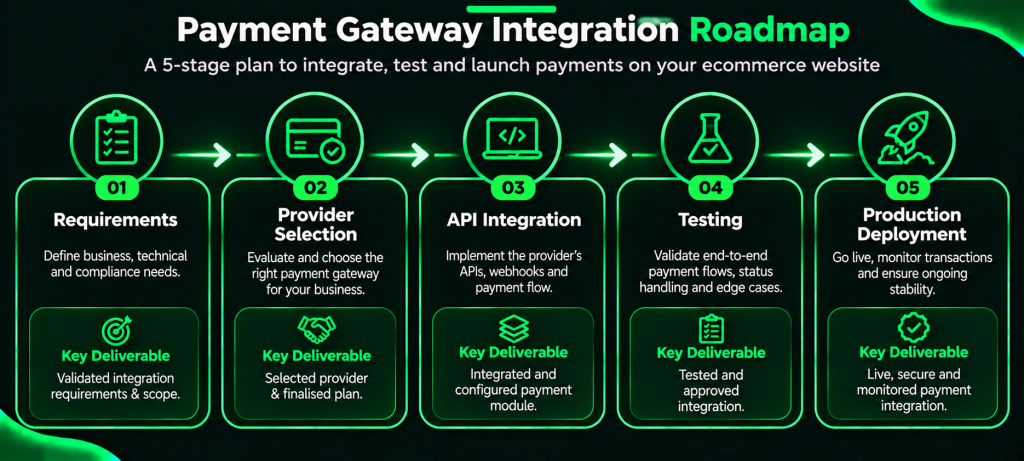
You choose a provider, complete merchant onboarding, build the checkout and server-side payment logic in a sandbox, add signed webhooks, test every outcome, and then switch to production credentials. A typical ecommerce payment gateway integration has sixteen steps, grouped below.
Plan And Onboard (steps 1–6)
- Identify Requirements: List payment methods, expected order volumes, average order value, refund rules, subscription needs and your tech stack.
- Shortlist Providers: Use the criteria in the selection section below.
- Review Onboarding Requirements: Providers usually ask for business registration, bank account details and identity documents. Requirements vary by provider and business category.
- Create A Merchant Account.
- Complete Verification: Approval can take longer than development, so start early.
- Get Sandbox Credentials: Providers give test keys that move no real money.
Build (Steps 7–13)
- Pick The Integration Method from the table above.
- Configure The Frontend Checkout: Load the provider’s SDK or secure fields. Never build your own card form that touches raw card data.
- Create Payments On The Backend: Your server creates an order with the gateway, sending the amount and your internal order ID. It receives a provider order ID back.
- Verify Payments On The Server: Check the signature or query the status API, then compare the amount, currency and order ID.
- Set Up Signed Webhooks: Register an HTTPS endpoint, verify each signature, and respond quickly.
- Implement Status Updates: Map provider states (created, authorised, captured, failed, refunded) to your order states.
- Configure Refunds And Reconciliation: Call the refund API from your admin panel, store the refund reference and match settlement reports to orders.
Test And Launch (steps 14–16)
- Test Every Transaction Scenario from the checklist below.
- Complete Production Onboarding. Swap in live credentials and live webhook URLs.
- Run Final go-live Checks: Place a small real transaction, refund it and confirm the settlement report.
Key terms you will meet:
- API: The set of requests your server sends to create orders, fetch status and issue refunds.
- SDK: A provider-built library that handles checkout screens and device-level tasks.
- API Credentials: A public key identifies your account in the browser. A secret key authorises server calls and must never appear in frontend code or public repositories.
- Payment Token: A stand-in for sensitive data, such as a network token for a saved card.
- Callback: The browser’s return to your site after payment. Useful for user experience, not for proof.
- Webhook: The server-to-server event notice described earlier.
- Order ID And transaction ID: Your internal reference and the provider’s payment reference. Store both.
- Idempotency: Processing the same request or event once, however many times it arrives.
A simple developer workflow looks like this:
1. Customer clicks Pay.
2. Server: create internal order (status: created, amount from server-side cart).
3. Server: call gateway "create order" with amount + internal order ID.
4. Browser: open provider checkout using the returned provider order ID.
5. Customer pays.
6. Browser callback: show "confirming payment" page only.
7. Server: verify signature / query status API; compare amount.
8. Webhook arrives: verify signature; check event ID not seen before.
9. Update order to paid; trigger fulfilment, invoice, stock update.
10. Log provider transaction ID for reconciliation.
For stores with custom carts, loyalty logic or marketplace splits, the build is real application work. Our custom ecommerce integration service covers the API layer, status handling and admin tooling that this workflow needs.
Never publish or commit real keys. Use environment variables or a secrets manager, rotate keys when staff leave, and keep sandbox and production credentials strictly separate.
How Long Does Payment Gateway Integration Take?
It depends on the method and on provider approval. As an indicative range, a plugin-based setup on a standard platform can take a few days of work, while a custom API integration with refunds, webhooks and reconciliation often takes several weeks. Merchant verification runs on the provider’s timeline and can add days or more. Treat these as planning estimates, not promises.
Payment Gateway Integration Challenges And Solutions
How Are Failed Online Payments Handled?
Show the customer a clear reason when one is available, keep the cart intact, offer a safe retry with the same or a different method, and confirm the final status on the server before cancelling anything. A failed attempt on one method should not lock the order. Retries must reuse your order reference so the customer cannot pay twice for one basket.
| Common problem | Recommended solution | Operational impact if ignored |
|---|---|---|
| Payment failure | Show clear error messages and a safe retry path | Lost sales, repeat support calls |
| Payment pending | Verify through server-side checks and provider notifications | Customers pay twice out of doubt |
| Duplicate payment attempts | Use unique order references and idempotent processing | Double charges, refund workload |
| Customer redirected but order not updated | Rely on server-side verification and webhooks | Paid orders that look unpaid |
| Delayed webhook | Process events safely on retry and reconcile regularly | Late fulfilment |
| Refund delays | Track refund references and status updates | Chargebacks, complaints |
| UPI timeouts | Hold a pending state instead of assuming failure | Wrongly cancelled paid orders |
| Settlement mismatch | Reconcile gateway reports with order and accounting records | Accounting errors, revenue leakage |
| Suspicious transactions | Apply fraud rules and review flagged orders | Chargebacks, fraud losses |
| Checkout abandonment | Simplify the payment journey and track drop-off points | Lower completed orders |
The settlement row deserves its own note. Finance teams usually find mismatches weeks after they start. Build a daily job that compares the provider’s transaction report with your order table, flags differences in amount, status or fees, and pushes clean records into your accounting system. Linking this to your finance tools through CRM and ERP integration removes most manual spreadsheet matching.
Payment Gateway Security And Compliance In India
How Can Businesses Secure Online Payment Transactions?
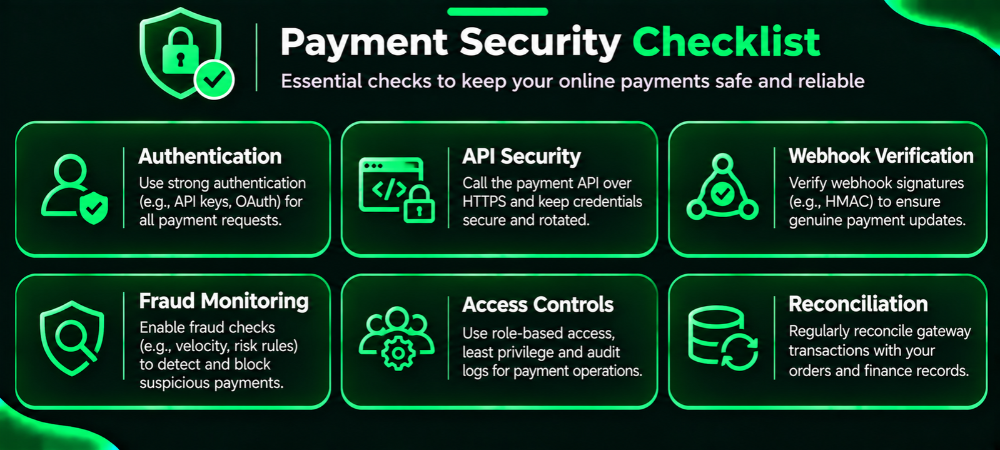
Use HTTPS everywhere, keep secret keys on the server, verify every payment and webhook signature, avoid touching raw card data, limit staff access to payment tools, and monitor for fraud. No single control is enough, so layer them.
A payment gateway does not make your whole website compliant. The provider secures its part of the chain. You remain responsible for yours.
The Split Looks Like This:
| Area | Merchant responsibility | Provider responsibility |
|---|---|---|
| Transport security | Serve your site and webhook endpoint over HTTPS | Secure its own APIs and checkout |
| Credentials | Store secret keys safely, rotate them, never expose them in frontend code | Issue and manage keys, offer revocation |
| Payment verification | Verify signatures and amounts on your server | Sign responses and webhooks, provide status APIs |
| Card data | Avoid storing it; use tokens | Handle card capture and tokenisation within its certified environment |
| Authentication | Support the authentication flows the provider presents | Run required customer authentication with banks and networks |
| Access control | Limit refund and settlement permissions, keep audit logs | Provide dashboard roles and logs |
| Fraud | Review orders, set business rules | Offer risk tools and monitoring |
| Disputes | Respond to chargebacks with order and delivery evidence | Route disputes and communicate timelines |
Three points deserve emphasis:
- Webhook Signatures: Without verification, anyone who finds your endpoint can post a fake “payment captured” event.
- Tokenisation: RBI’s rules on card data storage mean merchants should not keep full card numbers. Use provider tokens for saved cards and check the current RBI circulars for the exact scope.
- PCI DSS: The Payment Card Industry Data Security Standard applies to entities that store, process or transmit card data. A hosted checkout lowers your scope but does not erase it. Ask your provider which PCI DSS validation applies to your integration method. You can also see how we approach secure ecommerce builds for Indian brands.
Compliance rules change. Before you publish or rely on any regulatory statement, check the latest RBI directions on payment aggregators and payment gateways, RBI’s rules on authentication and card tokenisation, and NPCI’s UPI guidance. Where your provider sets requirements of its own, those apply too.
How To Test A Payment Gateway Before Launch
Sandbox testing lets you break things safely. Production testing costs real money and can confuse live reporting. Complete every scenario below in the sandbox first, then run a small live check after go-live.
Payment Outcomes
- Successful UPI transaction
- Failed UPI transaction
- Pending UPI transaction that later succeeds
- Successful card transaction
- Declined card transaction
- Payment timeout
Customer Behaviour
- Customer closes the browser during payment
- Duplicate payment attempt on the same order
- Payment received but order confirmation delayed
Webhooks
- Duplicate webhook delivery (order must not be processed twice)
- Invalid webhook signature (request must be rejected)
Refunds And Cancellations
- Full refund
- Partial refund
- Refund status delay
- Order cancellation after payment
Finance
- Reconciliation of payment and settlement reports against orders
Pay particular attention to the pending and closed-browser cases. They produce most real-world surprises, and almost no demo ever shows them. After launch, watch payment success by method, failure reasons and webhook delays weekly, so you catch a problem before customers report it. If you want a second opinion on your current checkout, a free digital audit is a practical first step.
How Much Does Payment Gateway Integration Cost In India?
How Much Does Payment Gateway Integration Cost In India?
The cost of ecommerce payment gateway integration has two parts: what you pay the provider and what you pay to build and maintain the integration. Neither has a single fixed price, because both depend on your provider, business category, payment mix, volume and the negotiated terms. Any article that quotes one number for everyone is guessing.
| Cost component | What to expect |
|---|---|
| Setup or onboarding charges | Some providers charge none, others charge for activation or premium features. Confirm in writing |
| Transaction fees | Usually a percentage per transaction, varying by method, plus tax on fees |
| Method-specific charges | Cards, net banking, wallets, EMI and international cards often carry different rates |
| Integration and development | Depends on method: plugin setup is light, custom API work is a real project |
| Platform or plugin costs | Some plugins or platform apps carry licence fees |
| Refund and chargeback costs | Check whether fees on refunded transactions are returned and what dispute fees apply |
| Maintenance and support | Ongoing updates, monitoring, key rotation and incident handling |
| International payment charges | Extra fees and currency conversion margins where enabled |
Here is an illustrative calculation, not a quote. Suppose a provider charged 2% on a ₹1,00,000 month of card sales. The fee would be ₹2,000, with applicable taxes added. Real rates differ by provider and method, so replace that percentage with the figure on your signed agreement.
To estimate your own cost, take your monthly order volume, split it by payment method, apply each method’s fee from the provider’s current pricing page, add tax, then add development and maintenance. Request written quotes from at least two providers. Do not rely on old blog posts or comparison sites for rates. For the wider build budget beyond payments, see our ecommerce website development cost guide.
How To Choose The Right Payment Gateway For Your Business
Which Payment Gateway Is Best For Ecommerce Businesses In India?
No single gateway is best for everyone. The right one matches your payment mix, your technology, your volume and your support needs. Compare shortlisted providers against the same criteria, ask for current documentation and pricing, and test each in a sandbox before you commit.
| Evaluation factor | What to check |
|---|---|
| Payment methods | UPI intent and QR, cards, net banking, wallets, EMI |
| Integration options | APIs, SDKs, plugins, hosted checkout, documentation quality |
| Security | Authentication, tokenisation, risk controls, certifications |
| Reliability | Published success-rate data, status page, incident history |
| Refunds | Full and partial refunds, refund timelines, API support |
| Settlement | Settlement timelines, hold rules, report formats |
| Reconciliation | Transaction IDs, downloadable reports, reconciliation APIs |
| Support | Technical support quality, escalation paths, response times |
| Pricing | Transaction fees plus hidden or add-on costs |
| Scalability | Behaviour at peak load, such as sale days |
| International support | Supported currencies and merchant eligibility |
Two practical tips. First, read the developer documentation before you read the sales page. Clear docs, a working sandbox and good error messages predict how your integration will go. Second, ask each provider how it handles pending UPI payments and delayed webhooks. Their answers show how mature the product is.
This guide does not rank providers, because rankings go stale and rates differ by merchant. Build your own scorecard from the table above and weigh each factor by what matters to your business.
Payment Gateway Integration For Different Business Models
Payment needs shift with the business model. A setup that suits a fashion brand can fail a wholesaler.
- D2C And Retail: Prioritise UPI and cards, offer prepaid incentives where margins allow, manage COD separately and keep refunds quick, since returns are common.
- B2B Ecommerce: Support net banking and bank transfers, link payments to invoices and purchase orders, and build reconciliation first, as large payments and part-payments create matching work.
- Subscription Businesses: Use the provider’s recurring payment features, record customer consent, follow RBI’s rules on recurring mandates and build a recovery flow for failed renewals, with reminders and retry rules.
- Marketplaces: Check whether the provider supports seller settlements, split payments and per-seller reconciliation, and confirm how the provider’s regulatory model treats funds held for sellers.
- Mobile Commerce: Use the provider’s mobile SDK, support UPI intent for fast app switching and test on low-end Android devices and weak networks. If you are planning an app, our mobile app development team can scope the SDK work.
Common Payment Gateway Integration Mistakes To Avoid
| Mistake | How to avoid it |
|---|---|
| Choosing only the lowest transaction fee | Compare reliability, support, settlement terms and total cost |
| Ignoring payment-method support | Match methods to your customers before you sign |
| Skipping server-side verification | Verify signature or status on the server for every payment |
| Treating the redirect as proof of payment | Use the redirect for display only; confirm through the server |
| Ignoring webhook verification | Check signatures and reject unsigned requests |
| Not handling duplicates | Store transaction and event IDs and process each once |
| Not testing pending payments | Simulate delays and timeouts in the sandbox |
| Ignoring refund workflows | Build refund tools, references and customer messages early |
| Not reconciling settlements | Run daily or weekly automated matching |
| Storing credentials insecurely | Use environment variables or a secrets manager and rotate keys |
| Ignoring failure analytics | Track failures by method, bank and reason, then act on patterns |
| Launching without sandbox testing | Complete the full checklist before using live credentials |
| Not monitoring after launch | Set alerts for success-rate drops and webhook delays |
Most of these share one cause: teams treat payments as a feature to ship once. Payments behave more like a service you operate. Banks change flows, providers update APIs and customer habits move. Assign an owner for payment health after launch. Pairing payment analytics with conversion rate optimization shows where customers drop off and which fixes matter most.
Integrate Secure Ecommerce Payments With Viacon
Viacon builds ecommerce platforms and delivers ecommerce payment gateway integration for Indian businesses, from plugin setups for growing stores to custom API work with webhooks, refund tooling and reconciliation. We start with your payment mix, volumes and systems, then recommend an integration method rather than a favourite provider. If you want a second look at an existing checkout, or a plan for a new build, talk to our team about your requirements.
Get Payments Right Once, Stop Fixing Them Forever
Ecommerce payment gateway integration is a business-critical system, not a plugin checkbox. The fundamentals are consistent. Pick a provider that fits your payment mix, create orders on the server, verify every payment there, process webhooks safely, handle pending and duplicate states, test every scenario in a sandbox and reconcile settlements on a schedule.
Get those right, and customers pay without noticing the machinery; your team stops chasing missing orders and finance closes the month without spreadsheet archaeology. Start by mapping your current checkout against the testing checklist above. The gaps you find will tell you what to fix first.