Most teams pick a platform before they pick an architecture. That order costs them later. The static vs dynamic websites decision shapes your page speed, your monthly hosting bill, your security workload, and whether AI answer engines can read your pages at all.
Here is the short version. A static site ships pre-built HTML from a CDN. A dynamic site builds each page on a server the moment someone asks for it. Both look modern. Both feel interactive. But they break in different ways, and they cost very different amounts to run.
This guide covers the parts most comparisons skip: rendering modes, crawl budget, AI search visibility, three-year cost, and who on your team will actually press publish.
| Quick Answer: Pick a static website when content changes on your schedule. Pick a dynamic website when the page must react to the visitor login state, cart, stock, or search. Most serious sites in 2026 run both, page by page. |
What Static vs Dynamic Websites Really Means
Skip the textbook definitions for a moment. The label describes one thing: when your HTML gets built.
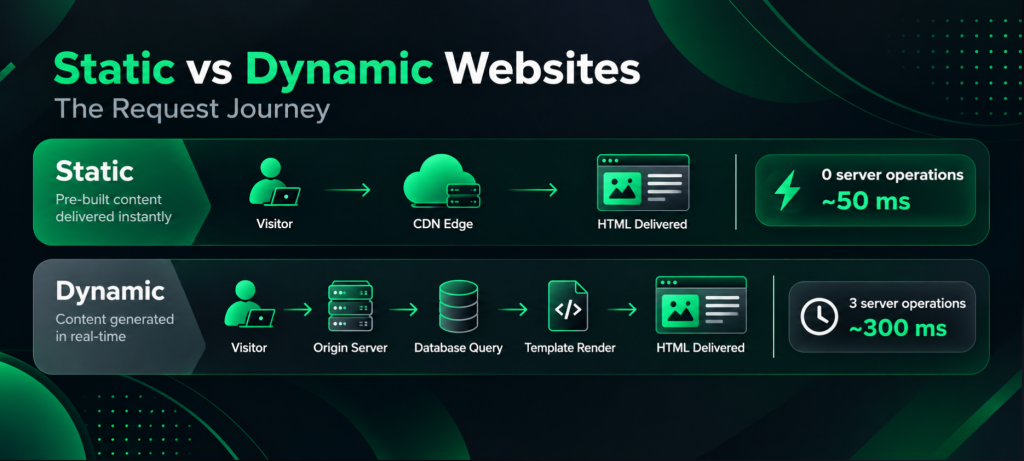
A static site builds its HTML ahead of time. A build process writes the files once, and a CDN serves the same file to everyone. The server does no thinking.
A dynamic site builds its HTML on request. A visitor asks for a page, a server queries a database, assembles the markup, and sends it back. Every single visit triggers that work.
The word “static” confuses people because it sounds like “basic.” It isn’t. A statically built page can run animations, load a cart, filter results, and sign users in. JavaScript in the browser handles all of it after the page arrives. Instagram and LinkedIn both serve statically hosted shells and pull content through APIs afterwards.
So the real question is not whether you want interactivity. Everyone wants interactivity. The question is where your HTML gets assembled, and what that choice costs you. Our custom web development team settles this before a single design file opens.
| What Is The Main Difference Between Static And Dynamic Websites? A static website serves pre-built HTML files that arrive identical for every visitor, until JavaScript changes them in the browser. A dynamic website generates HTML on a server for each request, so two people can receive different pages from the same URL. |
What Is A Static Website?
A static website stores finished pages on a server or a CDN edge node. No database sits behind it. No server-side code runs when a request lands. The file goes out exactly as it sits on disk.
Modern static sites rarely mean hand-coded HTML any more. A static site generator Astro, Hugo, Eleventy, or Next.js in export mode takes your content and templates, then produces those files during a build step. You publish the output. Hosting often costs nothing.
Static Architecture Suits:
- Marketing and brochure sites
- Documentation and knowledge bases
- Portfolios and personal sites
- Campaign landing pages
- Editorial blogs on a publishing schedule
- Event and product microsites
Three Myths Worth Retiring
Static Sites Can’t Have Forms: They can. Netlify Forms, Formspree, and serverless functions accept submissions without a backend of your own.
You Can’t Search A Static Site: Pagefind, Algolia, and Typesense index static content and return results in milliseconds.
Logins Need A Dynamic Backend: Auth0, Clerk, and Supabase authenticate from the browser, then deliver gated content through an API.
What Is A Dynamic Website?
A dynamic website assembles pages at request time. A server runs code in PHP, Python, Node.js, or Ruby, pulls data from a database, merges it with a template, and returns finished HTML.
WordPress works this way by default. So do Shopify stores, marketplaces, banking portals, and anything with user accounts. Roughly 41% of all websites run on WordPress, according to W3Techs, which tells you how much of the web sits on dynamic foundations.
Dynamic architecture earns its keep when a page must know something about the person viewing it. Stock levels, local currency, a half-filled cart, a personalised feed none of that survives in a file built last Tuesday.
Dynamic Architecture Suits:
- eCommerce stores with live inventory
- Marketplaces and booking platforms
- Membership sites and SaaS dashboards
- News publishers posting several times a day
- Forums and community products
- Government, banking, and insurance portals
Our ecommerce website development services lean dynamic for exactly this reason. Catalogue data changes faster than any build schedule can follow.
| Is WordPress A Static Or Dynamic Website? WordPress is dynamic out of the box, because PHP builds each page when a visitor requests it. However, caching plugins and headless setups push WordPress towards static delivery, where a CDN serves saved copies instead of running PHP on every visit. |
Static vs Dynamic Websites: The Full Comparison
| Factor | Static website | Dynamic website |
|---|---|---|
| HTML built | At build time | At request time |
| Same page for everyone | Yes, until JavaScript changes it | No, the server varies it |
| Server work per visit | None | Database query plus render |
| Typical TTFB | 20–80 ms from a CDN edge | 200–600 ms, worse under load |
| Hosting | CDN or object storage | App server plus database |
| Indicative hosting cost | $0–$25 a month | $40–$2,000+ a month |
| Traffic spikes | CDN absorbs them | Needs headroom or caching |
| Attack surface | Very small | Server, database, plugins, sessions |
| Publishing a change | Rebuild, then redeploy | Save in the CMS, live at once |
| Personalisation | Client-side, after load | Server-side, in the first response |
| Build time at scale | Grows with page count | Stays flat |
| Who can update it | Depends on the CMS layer | Anyone with CMS access |
Use this table as a reference sheet whenever the static vs dynamic websites question surfaces in a scoping call. Read it as a set of trade-offs, not a scoreboard. Static architecture buys speed and cheapness at the price of flexibility. Dynamic architecture buys flexibility at the price of ongoing cost and maintenance.
Beyond Static vs Dynamic Websites: Five Rendering Modes
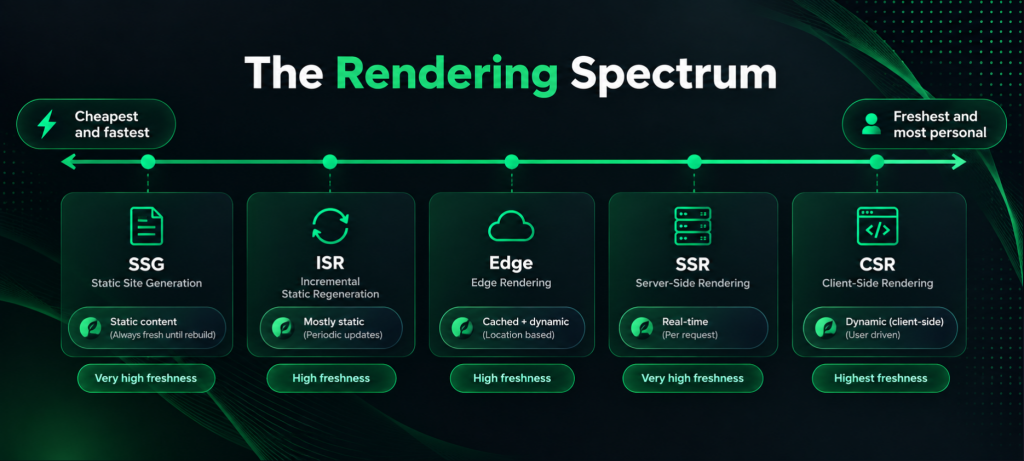
Here is where most comparison articles stop, and where the useful decision actually starts. Modern frameworks let you choose rendering per page, not per site. Five modes matter.
SSG – Static Site Generation: Pages build once at deploy. Fastest delivery, cheapest hosting, stalest content.
ISR – Incremental Static Regeneration: Pages build once, then refresh quietly on a timer or on demand. Static speed with a freshness window.
SSR – Server-Side Rendering: The server renders on every request. Always current, always paying compute.
CSR – Client-Side Rendering: The browser builds the page after downloading a near-empty shell. Avoid it for anything you want ranked or cited.
Edge rendering. Code runs at a CDN node near the visitor, so personalised HTML arrives with near-static latency.
| Mode | Content freshness | Typical TTFB | Server cost | Best fit |
|---|---|---|---|---|
| SSG | Frozen at build | ~50 ms | Near zero | Marketing, docs, blogs |
| ISR | Minutes | ~50 ms | Very low | Catalogues, news, listings |
| SSR | Per request | 200–500 ms | Highest | Checkout, search, dashboards |
| CSR | Per interaction | Fast shell, slow content | Low server | Screens behind a login |
| Edge | Per request | 50–120 ms | Moderate | Geo pricing, experiments |
| Is A Static Site Generator The Same As A Static Website? Broadly, yes. A static site generator produces the pre-built HTML files that make a site static. The output behaves like a classic static website, though the authoring experience feels closer to a modern CMS. |
How Do Static vs Dynamic Websites Affect SEO?
Search engines reward speed, and static delivery wins on speed by default. Still, the SEO gap is narrower and stranger than most articles claim.
- Crawl Budget: Googlebot slows down when your server does. A dynamic site responding in 400 ms gets crawled less thoroughly than a static one at 50 ms. On a 200-page brochure site, nobody notices. On a 300,000-SKU store, that difference decides which products reach the index this quarter.
- Core Web Vitals: Static delivery gives you a head start on LCP, because the first byte arrives sooner. Yet a bloated static page with unoptimised hero images still loses to a lean dynamic page. Architecture sets your ceiling; discipline decides where you land beneath it.
- JavaScript Rendering Delay: Google reads your raw HTML first, then queues the page for a headless browser that runs your scripts. That second pass can lag by hours or days. Content that appears only after hydration therefore reaches the index late, or inconsistently.
- Parameter Sprawl: Dynamic sites spin off filter, sort, and session URLs, and each variation can become crawlable. Canonical tags and robots rules keep that contained. Our technical SEO checklist walks through the fixes in order.
| Are Static Websites Better For SEO Than Dynamic Websites? Static websites start with an advantage in speed and crawl efficiency, but they do not rank higher automatically. Google indexes server-rendered dynamic pages perfectly well. The architecture that genuinely hurts visibility is client-side rendering, where the raw HTML arrives empty. |
The AI Search Gap Nobody Mentions
This one reshapes the calculation, and almost no competing article covers it.
AI answer engines crawl with their own bots, and those bots do not run JavaScript. Vercel and MERJ analysed more than 500 million GPTBot fetches and found zero evidence of JavaScript execution. ClaudeBot and PerplexityBot behave the same way. They download your script files sometimes, then never run them.
Googlebot does render JavaScript, so Gemini and AI Overviews can see client-rendered content. Every other engine reads the raw HTML and moves on.
The consequence is blunt. A page can rank first on Google while staying invisible to ChatGPT, Claude, and Perplexity. If your pricing table, spec sheet, or service copy loads through client-side JavaScript, those engines receive an empty div and cite someone else.
Both static generation and server-side rendering solve this, because both ship real content in the first response. Client-side rendering does not. That single fact now pushes many teams away from SPA-style builds for public pages, and we bake the constraint into every SEO strategy we run.
| Do AI Crawlers Like ChatGPT And Claude Read JavaScript? No. GPTBot, ClaudeBot, PerplexityBot and similar crawlers read only the HTML your server returns. Gemini is the exception, because it borrows Googlebot’s rendering. To stay visible in AI answers, ship your important content inside the initial HTML response. |
What Each Architecture Actually Costs Over Three Years?
Cost is where the static vs dynamic websites choice turns concrete. Vague talk about “static is cheaper” helps nobody. Below are indicative three-year ranges for a mid-sized business site. Local rates vary, so treat them as a shape, not a quote.
| Cost line (3 years) | Static site | Dynamic site |
|---|---|---|
| Design and build | $4,000–$25,000 | $8,000–$60,000+ |
| Hosting and CDN | $0–$900 | $1,400–$30,000 |
| CMS licence or plugins | $0–$1,800 | $600–$9,000 |
| Security patching | Minimal | 2–6 hours a month |
| Developer time per content edit | High without a CMS layer | Near zero |
| Traffic spike capacity | Included | Billed extra |
Two patterns repeat across projects. Static wins on running cost and loses on flexibility. Dynamic costs more every month but absorbs change without developer time.
One variable decides the true total: how often your content changes, and who changes it. A static site that needs a developer for every price tweak quietly costs more than a WordPress install. So map your publishing workflow before you compare quotes from any web development agency.
Security And Maintenance: A Genuine Difference
Security rarely tops the static vs dynamic websites checklist, though it probably should. A static site offers almost nothing to attack. No database, no admin login, no server-side execution. In the worst case, someone tampers with a CDN file, and you redeploy the last good build in minutes.
Dynamic sites carry a standing maintenance obligation. Plugins ship vulnerabilities. Frameworks need patching. Admin panels invite brute-force attempts. None of that argues against dynamic architecture, but it does argue for budgeting the upkeep honestly.
Regulated sectors feel this hardest. Healthcare, finance, and legal sites handle data that raises the stakes on every form and third-party script. Our guide to medical website design shows how compliance reshapes those choices.
| Which Is More Secure, A Static Or A Dynamic Website? A static website is harder to attack because it exposes no database and runs no server-side code. A dynamic website can reach the same standard, though only with active patching, hardened admin access, and monitoring. |
Who Will Actually Update The Site?
This question kills more projects than performance ever does, yet comparison articles rarely raise it.
A dynamic CMS hands your marketing team a login, an editor, and instant publishing. No deploy. No developer. And no queue.
A bare static site hands them a Git repository and Markdown files. Most marketing teams never touch it. Six months later, the blog sits dead, and the pricing page reads wrong.
The fix is a content layer. Git-based editors such as Decap and TinaCMS, or headless platforms such as Sanity, Storyblok, and Contentful, give non-technical editors a real interface while the site still builds statically. Budget for that layer from day one, which is why our website design services cover the editing experience and not just the front end.
Rule Of Thumb: If nobody on your team has opened a terminal, never ship a static site without a CMS on top.
The Hybrid Approach Most Strong Sites Use
Framing static vs dynamic websites as a binary made sense a decade ago. It doesn’t now.
Modern frameworks assign a rendering mode per route. One site can therefore serve a statically generated homepage, incrementally regenerated category pages, a server-rendered checkout, and an edge-personalised offer banner.
A practical eCommerce split looks like this:
| Page type | Rendering mode | Reason |
|---|---|---|
| Home, About, Blog | SSG | Rarely changes, needs speed |
| Category and product | ISR | Changes daily, high page count |
| Search results | SSR or edge | Query-specific output |
| Cart and checkout | SSR | Session data, never cached |
| Account dashboard | CSR behind auth | Private, no SEO value |
This layout gives you static speed on the pages that earn traffic and dynamic behaviour on the pages that earn revenue. Our breakdown of ecommerce website features that drive conversions shows how each page type performs once it goes live.
| Can One Website Be Both Static And Dynamic? Yes. Frameworks including Next.js, Astro, and Nuxt let you set the rendering mode route by route. Most high-performing sites now combine static pages for content with dynamic pages for transactions. |
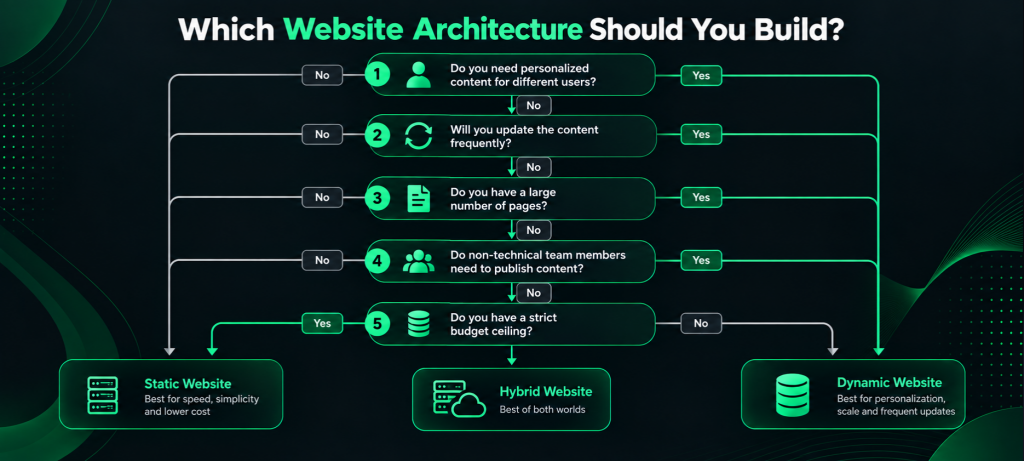
Static vs Dynamic Websites: A Five-Question Decision Framework
Answer honestly, then score one point per “yes” in each column.
Lean Static If:
- Your content changes weekly or less often.
- Every visitor should see the same page.
- Your site holds fewer than roughly 10,000 pages.
- Speed and crawl efficiency rank high among your goals.
- Your monthly running budget is tight.
Lean Dynamic If:
- Users log in, buy, book, or submit data that changes what they see next.
- Content updates several times a day.
- Stock, pricing, or availability shifts in real time.
- Non-technical staff publish without developer help.
- You run personalisation, experiments, or regional pricing on the server.
Score four or five on one side, and the answer is clear. Split scores point to hybrid, which is usually the honest outcome.
Signs You Picked the Wrong Architecture
Most static vs dynamic website mistakes announce themselves early. Watch for these symptoms, because each points to a specific mismatch.
- Builds Take Over 20 Minutes: Your static site has outgrown full rebuilds, so move those routes to ISR.
- A Developer Edits Copy Every Week: You need a CMS layer, not a new architecture.
- TTFB Exceeds 600 ms On Cached Pages: Your dynamic stack needs caching or edge delivery, urgently.
- Rankings Hold Up, But AI Tools Never Cite You: Client-side rendering is hiding your content.
- Hosting Costs Rise In Lockstep With Traffic: Static or ISR routes would flatten that curve.
- Every Campaign Needs A Developer Ticket: Your landing pages belong on a page builder.
None of these calls for a full rebuild. Most need a single route moved to a different rendering mode, which an audit will surface quickly, and that is where our SEO services usually begin.
Moving Between Static And Dynamic Architectures
Teams revisit the static vs dynamic websites decision more often than they admit. Two moves come up repeatedly.
- WordPress To Static Or Headless: Keep the WordPress admin, expose content through the REST or GraphQL API, then build the front end statically. Editors keep their workflow, and visitors get CDN speed. Preserve every URL, or redirect one-to-one.
- Static To Dynamic: Logins or live inventory usually trigger this. Rather than rebuilding, add dynamic routes inside the existing project and leave the marketing pages exactly where they are.
URL drift is the real risk in both directions. So map old paths to new ones before launch, keep the XML sitemap accurate, and watch Search Console closely for two months afterwards.
More Questions About Static vs Dynamic Websites:
Q1. Which Loads Faster, A Static Or A Dynamic Website?
A: A static website loads faster in almost every like-for-like test, because a CDN returns a finished file instead of waiting on a server. Caching narrows the gap, though it rarely closes it.
Q2. Do Static Websites Work For eCommerce?
A: Yes, up to a point. Product and category pages work well as ISR routes, while cart and checkout need server rendering. Small catalogues run comfortably on a fully static front end with a headless commerce API behind it.
Q3. How Many Pages Can A Static Site Handle?
A: Around 10,000 pages marks the comfortable ceiling for full rebuilds on most setups. Past that, build times climb sharply, so teams switch those routes to incremental regeneration rather than abandoning static delivery.
Q4. Does Google Penalise Dynamic Websites?
A: No. Google indexes server-rendered dynamic pages without any penalty. Slow responses and duplicate parameter URLs cause problems, yet both are fixable within a dynamic stack.
Q5. Which Is Better For A Small Business Website?
A: Static usually wins for a small business brochure site, because the content changes rarely and the hosting costs almost nothing. Add a lightweight CMS so your team can edit copy without a developer.
How Viacon Helps You Choose
We scope architecture before design, because the wrong choice surfaces eighteen months later as a performance problem, a security incident, or a content team that stopped publishing.
Our website design and development work starts with three questions: what changes, how often, and who changes it. The answers point to static, dynamic, or a route-by-route hybrid, and we build accordingly across corporate sites, eCommerce platforms, portfolios, and web applications.
Still weighing static vs dynamic websites for your next build? Book a free consultation, and we will map your content workflow, traffic profile, and budget against the right architecture.